

ERP go-live readiness: what to check before you switch
Ten areas, and the single most useful number is not percentage complete. It is how many critical items are outstanding.
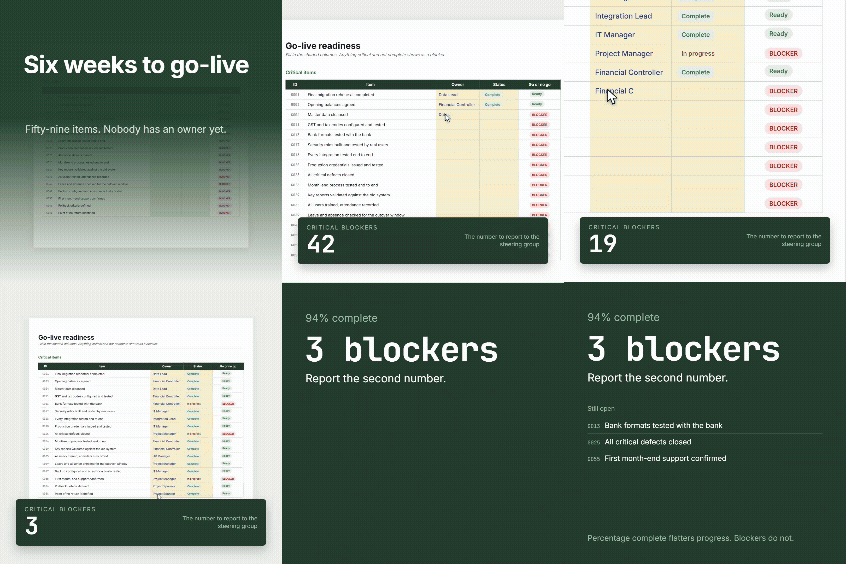
Percentage complete flatters progress, because the easy items get done first. A project at 85% with four critical blockers is not 85% ready.
The same project, two ways of describing it

![]()
Complete. Steering group relaxes. The easy items were always going to be done first.
critical blockers outstanding
Month-end untested. Backup never restored from. Two integrations without failure handling. Rollback criteria not agreed.
Take the number on the right to your steering group. The one on the left is not a measure of readiness, it is a measure of effort.
The checklist also counts two things that catch projects out in the final fortnight: items with no owner, and items marked complete with no evidence recorded. A tick with nothing behind it is the most dangerous entry in the sheet.
Go-Live Readiness Checklist
A working tracker for the six to eight weeks before go-live, plus a cutover runbook and a go or no go record.
- Format - Excel (.xlsx)
- Checks - 59, across 10 areas
- Also includes - Runbook, go or no go, dashboard
Cutover is a sequence, not an event
Plan it as a runbook: numbered steps, an owner for each, a planned start, a duration, and what it depends on. The template ships with an eighteen step starting sequence.
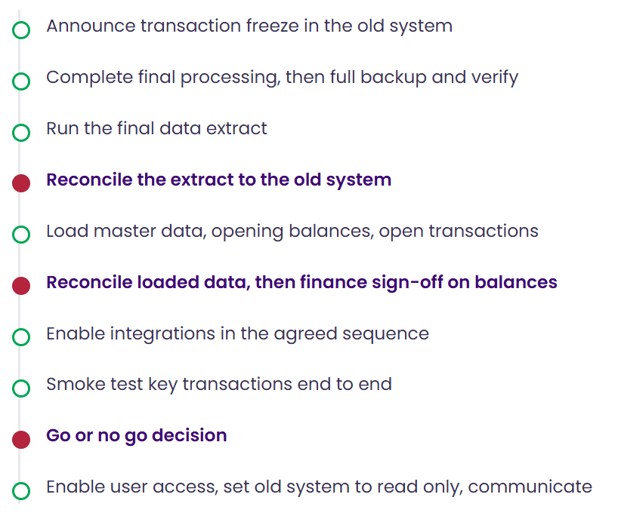
Two practical points. Print it, because on the night people work from paper and the network may be part of what is changing. And give every owner a named deputy, because cutover often runs overnight and someone will be unreachable.
The red steps are the reconciliations and the decision. They take longer than people plan for, they are under the most pressure to be rushed, and they are the ones you cannot undo later.
Agree the thresholds before you need them
Once a date has been communicated to customers, staff and a board, the pressure to go is enormous, and criteria set at that point tend to describe whatever the current situation happens to be.
Write the thresholds down in advance: zero critical blockers, data signed off by finance, no open critical defects without a workaround, month-end tested, integrations tested including failure handling, a stated percentage of users trained, support confirmed, rollback documented, backup restored, and the business accepting the operational impact.
A conditional go is a legitimate outcome and often the right one. But record the conditions and give each one an owner, because a conditional go with nothing written down is simply a go, and everyone will remember it differently.
On slipping. Dates slip, and it is frequently the right call. What causes damage is slipping late, repeatedly, in small increments, because nobody wanted to be the person who said it. Agree in advance how many blockers is too many and who makes the call. Then the conversation is about a rule everyone signed up to rather than one person's judgement on a difficult day.
Go-Live Readiness Checklist
A working tracker for the six to eight weeks before go-live, plus a cutover runbook and a go or no go record.
Common Questions
Avanza Solutions is a MYOB Acumatica implementation partner based in New Zealand. This checklist is published as a neutral planning aid. It applies to any ERP go-live, whichever system you have selected and whichever partner you are working with.
Ten areas: data reconciled and signed off by finance, configuration confirmed against the design, integrations tested including failure handling, testing complete with month-end run end to end, a recorded decision on parallel running, people trained with super users in place, business readiness for the disruption, the production environment built with a restore actually tested, support and hypercare confirmed through the first month-end, and rollback criteria agreed in advance.
Usually not across everything. Full parallel running doubles the workload at the point your team is under most pressure, and the fatigue causes its own errors. Targeted parallel running works better: pick the one or two areas where an error would be most damaging, and run those for one cycle. Payroll is the clearest case if it is in scope.
Normally the project sponsor, advised by the business owners of each area and the implementation partner. What matters more than who decides is that the thresholds were written down before the pressure of a communicated date made everyone flexible about them.
When the agreed criteria are not met, particularly on data reconciliation, critical defects, or backup and rollback. Delaying is normal and frequently correct. The damaging pattern is repeated small slips that nobody wanted to announce. Agree in advance how many outstanding critical items would trigger a delay, and who calls it.

