

Skip to content
Financial Management
Accounting, General Ledger, Accounts Payable, Receivable, and Cash Management, Reporting of financial operations.
Customer Management
An integrated CRM to manage marketing, quoting, sales, post-sales support, and customer information.
Field Service Management
Mobile Field Service for real-time data between the field and office, track equipment, maintenance and manage service orders.
Construction
Powerful financials, Job Cost Accounting, Project Management, Payroll, Inventory, Service Management, CRM, and more.
Manufacturing
Streamline operations from production planning and shop floor management to financials, CRM, inventory, and sales orders.
Project Accounting
Manage budgeting, inventory, change orders, timesheets, billing, profitability, and reporting for individual business initiatives. 
Wholesale Distribution
Advanced inventory management, WMS, serial and batch tracking, kit assemblies, bin location, pick/pack/ship.
eCommerce & Retail
Synchronise real-time data between MYOB Advanced ERP and BigCommerce or Shopify with a native connector.
Payroll & Workforce Management
A modern Cloud Payroll and HR Management Solution working alongside MYOB Advanced ERP.

All you need to Advance your business

MYOB Acumatica Cloud ERP has the flexibility to grow with your business.

Are you ready to take your business to the next level? 

Connect all your business functions with MYOB Acumatica in the Cloud

Wholesale Distribution
Advanced inventory management, serial and batch tracking, kit assembly, bin location, pick priorities, manage multiple customer and supplier price lists, order discounting.
Retail and eCommerce
Native eCommerce Connector provides tools for syncing data between MYOB Advanced ERP and leading eCommerce solutions, BigCommerce and Shopify.
Manufacturing
By connecting production planning, shop floor, financials, CRM, inventory management, and sales orders, it enables real-time coordination across your entire organisation.
Field Services Management
Streamline tasks, scheduling and routing, manage inventory of tools and parts, seamlessly integrate accounting, and administrative information into a single unified system.
Construction
Project Accounting, Project Billing, Contracts, Job Costing, Change Orders, Daily Field Reports, Retentions, Compliance, Mobile Applications, Payroll and Reporting in one solution.
Solutions for all industries
MYOB Advanced is designed to adapt to the ever-changing landscape of different industries. With customisation options, it effortlessly caters to a diverse range of industries. 

MYOB Acumatica Cloud ERP for New Zealand Businesses

Are you ready to take your business to the next level? 

Connect all your business functions with MYOB Acumatica in the Cloud

What should be in an ERP requirements document?

Stage 2 · Choosing a system

What your business needs to be able to do, in your own words, prioritised, with an owner against each line. Core functions, industry specifics, the platform and security requirements everyone forgets, and the things you need from the supplier rather than the software.

What it should not be is a feature list copied from a vendor's website. If your requirements happen to match one product's brochure, you have not written requirements. You have written a preference, and you ruled out better answers before you started.

WHAT MAKES THIS DIFFERENT

It records what your current system already does

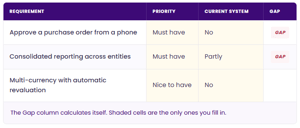
Most templates only ask what you want, which produces a wish list. Adding one column changes the exercise entirely.
erp requirements register

Requirements your current system already meets are not reasons to change, however important they are. The gaps are.

Someone who can say that thirty of their must haves are unmet today, and name them, has a business case. Someone with a list of two hundred wants has an opinion.

It also has a use nobody expects. Filling in that column reliably surfaces things people believed were impossible but were simply never configured or never demonstrated. Worth finding before you spend money replacing a system that could have done the job.

Excel · 3 tabs · free

ERP Requirements Template

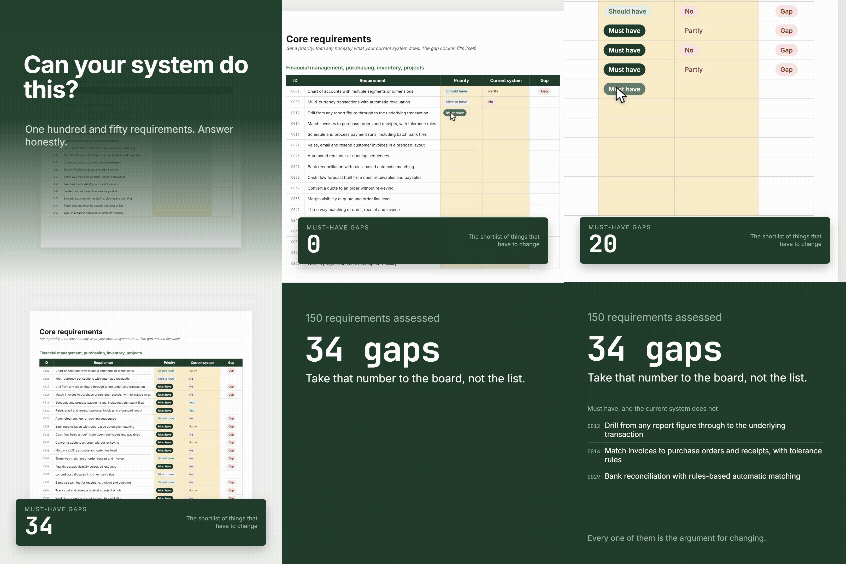
150 requirements already written and ready to edit, by function and by industry, with automatic gap analysis.

- Format - Excel (.xlsx)
- Core requirements - 100, across 14 functions
- Industry - 50, across 5 sectors
ERP Requirements list
WHAT TO COVER

Five areas, and two everybody skips

The core

Financial management, payables, receivables, banking and cash, sales and orders, purchasing, inventory and warehouse, projects and job costing, reporting, workflow and approvals.

Your industry

Construction needs progress claims aligned to NZS 3910, retentions, variations, subcontractor management, cost to complete. Manufacturing needs bills of materials, routings, MRP, traceability. Wholesale needs landed costs, EDI, batch and expiry. Field services needs scheduling and mobile.

Skipped: users and security

Role-based permissions to field level, restricting access by entity or branch, multi-factor authentication, single sign-on, audit logging.

Skipped: platform and data

A documented public API, bulk import and export without vendor involvement, a sandbox separate from production, backup retention, recovery objectives, where your data physically lives, and how you get it out if you leave.

New Zealand compliance, and the supplier

GST and IRD filing, Payday filing, KiwiSaver, Holidays Act leave calculation, PAYE, multiple pay frequencies. State these explicitly rather than assuming, because it is genuinely where international products struggle. And include what you need from the supplier: local implementation team, support hours matching your working day, contractual response times, a named account manager, a published roadmap, the ability to defer an upgrade, and a documented data extraction process on exit. Asking for those in writing produces better answers than asking in a meeting.

The two amber sections rarely appear in a requirements list written by the finance team, and they are where the expensive surprises live.

ERP Requirements Template

150 requirements already written and ready to edit, by function and by industry, with automatic gap analysis.

BUSINESS REQUIREMENTS

Five rules for writing them so they actually work

01

Who actually uses this, and how often?

Ask the users, not the person who commissioned it. Anything answered with "never" or "I'm not sure" is a retirement candidate.

02

Do not specify how it should work

Requirements describing a solution rather than a need rule out approaches you have not considered. You are buying an outcome.

03

Keep must have scarce

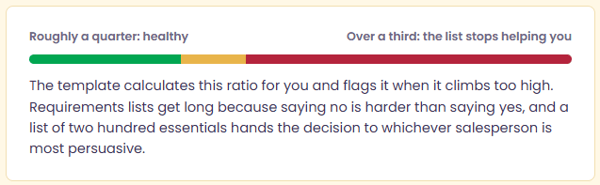
The discipline that makes everything else work. If most of your list is essential, you have given yourself no basis for choosing between options and no room to negotiate.
keep must have


04

Give every requirement an owner

Someone has to judge whether a vendor's answer is good enough, and it should not always be you. It also means whoever insisted on a requirement is the person who defends it when the list gets cut.

05

Write it with the people who do the work

Requirements written by managers describe how a process is supposed to run. Requirements written with the people running it describe how it actually runs, including the workarounds nobody has mentioned.

USING YOUR BUSINESS REQUIREMENTS

Three things to do once they're written

Send it to every vendor before they present. Comparing suppliers is only possible when they answered the same questions, and one who ignores your document and delivers a standard demo has told you something useful about how the project would go.

Use the must have gaps as your demo agenda. Ask for those specific things to be shown, in your terms, rather than sitting through a presentation built around the vendor's strengths.

Revisit it after the demos. Requirements change once you have seen what is possible. That is the process working, not a planning failure.

QUESTIONS

Common Questions

Avanza Solutions is a MYOB Acumatica implementation partner based in New Zealand. This template is deliberately vendor neutral. It is not modelled on the capabilities of any one product, including the one we implement, and it is designed to be useful whichever system you choose.

What should be in an ERP requirements document?

The core functions your business needs, written as outcomes rather than features. Requirements specific to your industry. Platform and security requirements including API access, data extraction, backup and where data is held. New Zealand compliance requirements such as GST filing, Payday filing, KiwiSaver and Holidays Act leave calculation. And requirements of the supplier rather than the software. Every line should have a priority and an owner.

How many requirements should it have?

There is no correct number, but the ratio matters more than the total. If more than roughly a third are marked must have, the list will not help you choose between suppliers and will leave you no room to negotiate. Cutting the must have list is usually the most valuable hour spent on the whole document.

Should I use a vendor's requirements template?

Be careful. A template produced by a supplier tends to reflect what that product does well, which quietly shapes the outcome before evaluation begins. Use a neutral starting list, then change the wording to match how your business actually talks, and add the things that matter to you that no template anticipated.

Should requirements include things our current system already does?

Yes, but mark them as met. They still belong in the document, because a new system must not go backwards. Recording that they are already met keeps them out of your case for changing, which should rest only on the gaps.