

What questions should you ask ERP vendors in a demo?
The ones that test evidence rather than capability. Almost every mid-market ERP can do almost everything on a feature list, so a checklist rewards the demo format and separates nothing.
Ask a vendor to show you rather than tell you. Ask what their system cannot do. Ask to speak to a customer whose project did not go smoothly. The quality of the discomfort tells you most of what you need to know.
Ask these if you have time for nothing else
A direct list of gaps with honest workarounds. Every system has them. A vendor who names none is not listening, or is not being straight with you.
Specific days by role, with the peak periods named. "Not much" is not an answer. Internal time is the largest hidden cost in any ERP project and the commonest reason they fail.
Integrations, data cleansing, training, reports. The most useful question in the entire process, and the one most rarely asked.
Genuine willingness, which is rare and highly informative. Refusal, or a claim that no such customer exists, tells you plenty on its own.
A defined extraction process in a usable format, at no or nominal cost. Ask before you sign. The answer is never better afterwards.
ERP Demo Question Bank
74 questions across 13 areas, each with why it matters, what a strong answer includes, and what to watch out for.
- Format - Excel (.xlsx)
- Questions - 74
- Areas - 13
- Includes - Scoring for 3 vendors
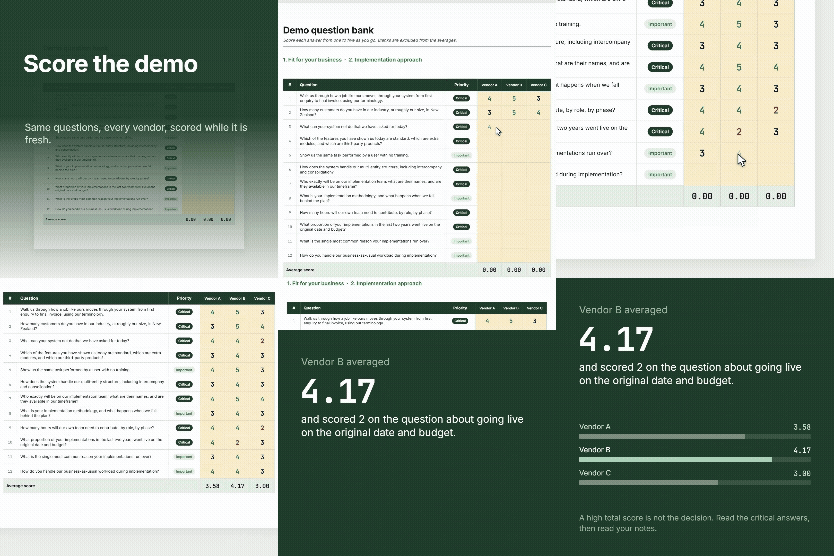
Do it during the demo, not afterwards
Memory flattens differences within about a day. Score each answer as you go, and write down what was actually said rather than just the number. In eight weeks, when you are building the business case, the notes matter more than the scores.5
Clear, specific, evidenced. They showed you rather than told you.
4
Good answer, minor gaps.
3
Adequate but general. Follow up in writing.
2
Vague, deflected, or deferred to a later conversation.
1
Evasive, or the answer revealed a real problem.
Take a colleague. One person asks, one person writes. Nobody does both well. And do not read out all 74. Pick the ones that matter for your situation, then ask every vendor the same set.
By area
These should be asked of every supplier. The workbook has all 74 with what a strong answer includes and what to watch for against every line.
- Walk us through how a job like ours moves through your system from first enquiry to final invoice, using our terminology.
- How many customers do you have in our industry, at roughly our size, in New Zealand?
- What can your system not do that we have asked for today?
- Which of the features you have shown us are standard, which are extra modules, and which are third-party products?
- How does the system handle our multi-entity structure, including intercompany and consolidation?
- Who exactly will be on our implementation team, what are their names, and are they available in our timeframe?
- How many hours will our own team need to contribute, by role, by phase?
- What proportion of your implementations in the last two years went live on the original date and budget?
- What does go-live support look like in the first two weeks, and the first three months?
- What is the total five year cost of ownership, including licensing, implementation, support, integration and annual uplifts?
- How does your licensing work, and what happens to the cost when we add twenty users or a new entity?
- What is your annual price increase policy, and what has it actually been for the last three years?
- What is not included in this quote that we will almost certainly need?
- Is the implementation quote fixed price, capped, or time and materials, and what triggers a variation?
- What data will you migrate as standard, and what is chargeable?
- How much transaction history can we bring across, and what does more history cost?
- Who is responsible for cleansing our data, us or you?
- How does the system handle GST, including the return and IRD filing?
- Is payroll included, and does it handle Payday filing, KiwiSaver and the Holidays Act?
- Who maintains New Zealand compliance updates, and how quickly are legislative changes released?
- How do you handle our industry-specific requirements, for example retentions and progress claims?
- What is the contract term, and what are the renewal terms?
- If we leave, how do we get our data out, in what format, and at what cost?
- What are your payment milestones, and are any tied to our acceptance rather than to elapsed time?
ERP Demo Question Bank
74 questions across 13 areas, each with why it matters, what a strong answer includes, and what to watch out for.
Common Questions
Avanza Solutions is a MYOB Acumatica implementation partner based in New Zealand. This question bank is published as a neutral aid to ERP evaluation. The questions are not written to favour any product, including the one we implement, and there are several in here we would rather not be asked ourselves.
Ask every vendor the same question set, score the answers at the time rather than afterwards, and weight the questions you have identified as critical rather than using a simple total. Record the actual answers alongside the scores. A high average can hide one disqualifying answer on data extraction, upgrade testing, or contract exit.
Long enough to see your own processes run rather than a scripted path. Two to three hours is typical for a serious mid-market evaluation, and it is reasonable to ask for a second session focused on the areas that matter most to you. A vendor unwilling to run a scenario you supply in advance is telling you something.
Reluctance to hand over the keyboard, features shown without confirming whether they are standard or extra, pricing that covers only year one, discounts that expire if you do not sign this quarter, and reference customers who are only available with the vendor present.
Finance, the operational areas that will use the system daily, and whoever will be accountable for the project internally. Include at least one person who does the actual day-to-day work rather than only managers, because they will spot the friction that a demo is designed to smooth over.