

What happens to your customisations when you migrate ERP?
They do not migrate. They get sorted, and only one of the four outcomes is expensive.
"Our customisations are unique" is the most common objection to changing ERP, and the least tested. Until someone lists every item and asks who uses it, nobody can say which group anything belongs in, so the whole set gets treated as untouchable and the migration is priced against an unknown.
The four potential outcomes for your customisations
The report nobody reads, the field added for a customer you no longer have, the workflow built around someone who left in 2019.

Consistently the largest group
Built to fill a gap that has since closed. Approval workflows, document layouts, multi-entity, mobile access.

Second largest, usually
The requirement is real but the way it was implemented cannot survive the move. Anything wired directly into the database lives here.

Second largest, usually
Encodes something specific to how your business operates, still used, and not available as standard.

Almost always the smallest
Customisations accumulate over a decade. Each one made sense on the day. Together they form a layer nobody has ever looked at as a whole, and organisations that examine it properly consistently find a meaningful part is simply dead.
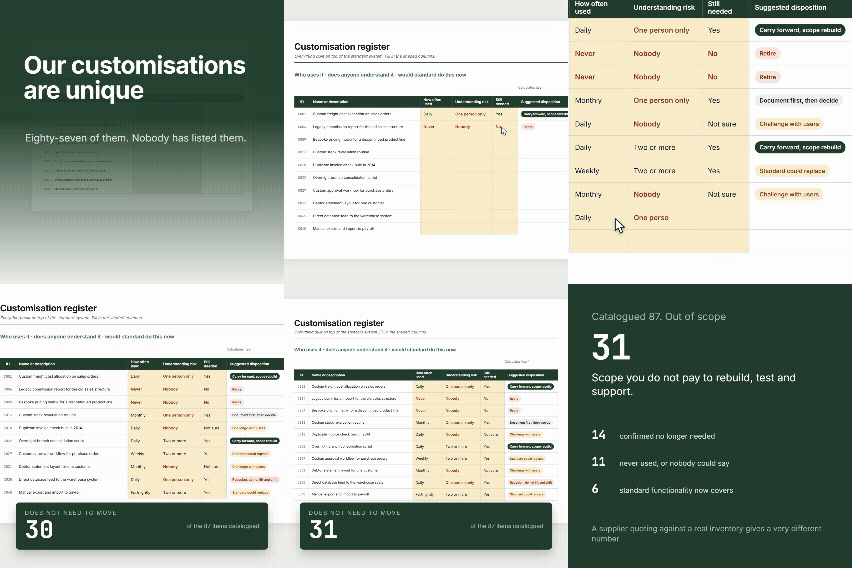
Customisation and Integration Register
Three registers with dropdowns and automatic disposition, plus a findings tab that counts retirement candidates and key person risks.
- Format - Excel (.xlsx)
- Registers - Customisations, integrations, reports
- Time to complete - About 2 days
What breaks hardest
Knowing the difference is what turns a list into a plan.Direct database connections
Anything reading or writing straight into the database, including reporting tools pointed at the back end, does not survive in any form. These always need redesigning, and they are frequently the last thing anyone looks for because IT built them rather than the ERP partner.
Undocumented scripts and business rules
Not because they are hard to rebuild, but because nobody can say with confidence what they do. You cannot safely retire what you do not understand, so it gets carried forward by default, at full cost.
Screen and form level customisation
Modern systems handle layout, fields and personalisation very differently. Attempting a faithful reproduction of an old screen is normally the wrong instinct and an expensive one.
Manual export and import routines
Not integrations at all. Someone is doing that by hand, on a schedule, forever. They rarely appear on any inventory because no software was ever purchased, and most are automation opportunities rather than migration scope.
Custom reports
Where the highest proportion of genuinely unused items hides. Reports get built, distributed, then quietly ignored while continuing to be produced.
Customisation and Integration Register
Three registers with dropdowns and automatic disposition, plus a findings tab that counts retirement candidates and key person risks.The four questions to ask for each business area
Who actually uses this, and how often?
Ask the users, not the person who commissioned it. Anything answered with "never" or "I'm not sure" is a retirement candidate.
Does anyone here understand how it works?
If the answer is nobody, that is a risk you are carrying right now. Migration does not create it, it just makes it visible.
Would standard functionality do this today?
Many customisations fill a gap that mainstream systems closed years ago. Ask for every item rather than assuming.
What breaks if it disappears tomorrow?
The fastest way to separate genuine dependency from habit. If nobody can answer, you have learnt something.
Say this out loud at the start of every session: nobody is in trouble for admitting something is not used. A register that flatters the current state is worse than no register at all, because it hardens a wrong number into a plan and a budget.
Ninety minutes per business area, with the people who use the system. Two days of effort in total is typical, spread over a fortnight so people can check things between sessions.
Three things to do next
Document the key person dependencies first. That work is worth doing whether or not you ever migrate, and it is the finding most likely to change someone's mind about how urgent this is.
Take the challenge list to the people who would notice. Not the person who built the item. The person who would ring you if it vanished. Get a yes or a no.
Give it to any partner or vendor you talk to. A supplier quoting against a real inventory produces a very different number from one quoting against an unknown, and comparing quotes becomes possible for the first time. Keep it afterwards as your scope baseline.
Common Questions
Avanza Solutions is a MYOB Acumatica implementation partner based in New Zealand. This register is published as a neutral planning aid. It is designed to be useful to you and to any partner or vendor you choose to work with, including one that is not us, and useful whether or not you decide to migrate at all.
They sort into four groups: retired because nothing depends on them any more, replaced by standard functionality that did not exist when they were built, redesigned because the implementation method cannot survive the move, and rebuilt because they encode something genuinely specific to your business. The last group is usually smaller than expected.
Direct database connections are the worst case and never survive, because the underlying table structure changes. Undocumented scripts and business rules are next hardest, not because rebuilding is difficult but because nobody can safely say what they do. Screen and form level customisation is usually cheaper to abandon than to reproduce faithfully.
Yes. It is the single most useful piece of preparation available to you. Suppliers quoting against an unknown have to price the risk, and you pay for that uncertainty. Quoting against a real inventory produces sharper numbers and makes comparing proposals possible.
For a mid-sized organisation, one ninety minute session per business area plus a few hours of collation. Two days of effort in total is typical, spread over a fortnight so people can check things between sessions.

