

What does it cost to stay on your current ERP?
Staying has a real annual cost. It is made of three things: the cash you pay in licences, maintenance, infrastructure and external support; the staff time your system consumes rather than saves; and the risks you carry because the software or hardware underneath it is ageing.
Most ERP business cases fail here. They present a precise cost of changing and set it against an unstated assumption that staying still is free. It is not free. It is unbilled.
Three categories
- Licence or subscription fees
- Maintenance and support contract
- Licences or modules added this year
- Third-party products filling gaps
- Server hardware replacement provision
- Hosting, colocation, data centre
- OS, database and remote access licences
- Backup and disaster recovery
- External IT support
- Upgrade projects, annualised
- Consultant and developer charges
Take these from twelve months of actual invoices, not from memory.
- IT time maintaining servers and integrations
- Re-keying between systems
- Building board packs in spreadsheets
- Manual consolidation across entities
- Month-end effort beyond the reasonable
- Chasing information that should be visible
- Manual payroll or compliance checking
- Correcting manual-handling errors
- Running reports for people without access
- Overtime at month end and year end
The section most often left out entirely, because nobody invoices for it.
- Outage on ageing or unsupported systems
- Losing the one person who understands it
- Security incident on an unpatched system
- Compliance error or audit finding
- Work lost to a capability you lack
- Emergency upgrade forced on you
Estimate impact, estimate likelihood, carry the product. This is the section a sceptical reader attacks first.
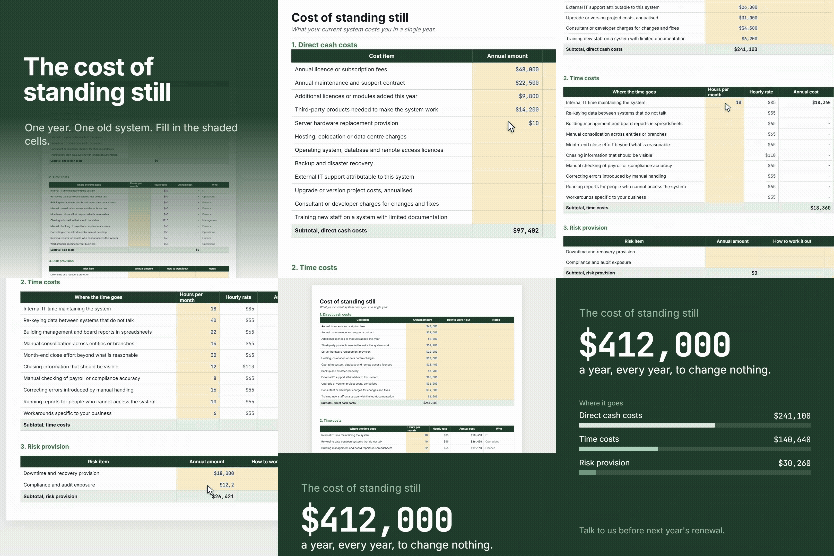
Cost of Standing Still worksheet
Assumptions, the full cost worksheet across all three categories, and a five year comparison with automatic payback.
- Format - Excel (.xlsx)
- Tabs - 4
- Time to complete - About 2 hours
Two costs almost everyone leaves out
A server costing $30,000 on a five year life is $6,000 every year, whether or not the invoice lands in this one. It belongs in an annual figure even in the years you do not spend it.
Upgrade projects are recurring costs that feel like one-offs. If your last one cost $60,000 three years ago, that is $20,000 a year of running cost.
For one task. Repeated indefinitely. It is invisible because nobody invoices for it, not because it is small.
Use fully loaded employment cost, not salary. Salary divided by 2,080 hours understates the real figure by roughly a third once leave, KiwiSaver, ACC and overhead are included. And ask the people who do the work to estimate their own hours. Their numbers will be more accurate than yours and they carry more weight with a board.
Set it against the cost of moving
The worksheet grows your annual total at your own historical increase rate and puts it beside the cost of changing across five years.
Fill the change side from real quotes rather than guesses. What you are looking for is the year the cumulative difference turns negative. That is the payback point, and it is the single most useful number the worksheet produces.
If it never turns negative on honest inputs, that is a genuine finding. Better to know now than after you have spent money discovering it.
Honest caveats
It is not a full investment appraisal. No discounting, no cost of capital. It is a running cost comparison, which is the right tool for the decision most organisations are actually making. If your board wants a discounted appraisal, this gives you the cash flows to build one.
The benefits of changing are not in it at all. Faster close, better visibility, capability you do not have. Those belong in the business case and they are real, but they are also the part everyone is already arguing about. This worksheet confines itself to the part nobody has counted.
Cost of Standing Still worksheet
Assumptions, the full cost worksheet across all three categories, and a five year comparison with automatic payback.
Before you download
Avanza Solutions is a MYOB Acumatica implementation partner based in New Zealand. This worksheet is published as a neutral planning aid. It is designed to be useful regardless of the outcome it produces, including a decision to stay on your current system.
Three things: direct cash costs such as licences, maintenance, infrastructure and external support; the staff time the system consumes through manual work, re-keying and spreadsheet reporting; and a provision for the risks you carry on ageing or unsupported software. The time component is usually the largest and is almost always left out.
Take twelve months of actual invoices. Add annualised amounts for hardware replacement and upgrade projects, since both recur even when they feel like one-offs. Then add staff time, as hours per month multiplied by a fully loaded hourly rate multiplied by twelve. Finally add a conservative risk provision.
Yes, and use fully loaded employment cost rather than salary. Salary alone understates the real cost by roughly a third once leave, KiwiSaver, ACC and overhead are included. Ask the people doing the work to estimate their own hours, because their figures will be more accurate and more persuasive to a board.
Then you have saved yourself considerable money and effort, and you have a documented basis for the decision that will still be valid when the question comes up again next year. A worksheet that only ever produces one answer is not a worksheet, it is a sales tool.