
If your finance team is still manually keying in supplier invoices, you already know the pain — the typos, the bottlenecks, the hours lost to repetitive data entry. What if your ERP could handle most of that for you?
With AP Bill Automation in MYOB Acumatica, it can. This AI-powered feature uses OCR technology to capture invoice data automatically, route bills through approval workflows, and maintain a complete audit trail — all without the tedious manual effort.
Let's walk through what it does and how to get started.
How It Works
Automatic Invoice Capture
AP Bill Automation can read invoices from multiple sources, including PDF uploads, dedicated email inboxes, and Outlook. It scans each invoice, extracts the key details — supplier information, invoice numbers, line items — and maps them to the correct fields in your AP bill. The result? Accurate data entry without the manual effort, fewer errors, and more time for your finance team to focus on work that actually needs a human touch.
Approval Workflows That Keep Things Moving
Once a bill is captured, it flows through your predefined approval workflows automatically. Approvers receive notifications and status updates so they can take action quickly, keeping the process transparent and on track. No more chasing people down for sign-off.
A Built-In Audit Trail
Every invoice processed is attached to its corresponding AP bill, creating a clear, easily retrievable audit trail. When audit season comes around (or a regulator comes knocking), your documentation is already in order.
Getting Started: Three Simple Steps
Setting up AP Bill Automation is straightforward. Here's what you need to do:
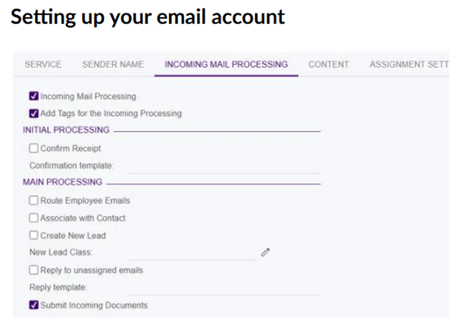
Step 1: Connect your email inbox. Navigate to Email Accounts and select the account you use for receiving supplier bills. Open the Incoming Mail Processing tab, then enable both the Incoming Mail Processing and Submit Incoming Documents options. Any PDFs attached to incoming emails will now be automatically scanned and queued for processing.
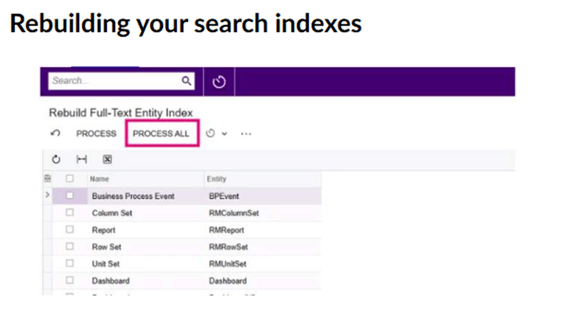
Step 2: Rebuild your search indexes. AP document recognition relies on MYOB Acumatica's search indexes to match invoices to suppliers and items. Go to Rebuild Full-Text Entity Index and select Process All — this ensures your data is ready for accurate matching.
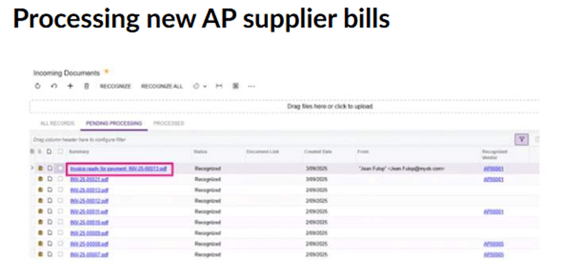
Step 3: Watch the invoices roll in. As supplier bills arrive in your email inbox, they'll be automatically recognised and added to the Incoming Documents screen, ready for review and processing.
Beyond Standard Invoices
AP Bill Automation handles more than just straightforward invoice processing. It also supports project-related billing by automatically linking invoices to purchase orders or subcontracts and populating project budget keys for accurate cost allocation. When automatic matching isn't possible, you can manually link invoices to the right records, ensuring proper accounting even in complex scenarios.
Why It Matters
Automating your accounts payable process isn't just about saving time (though it certainly does that). It's about reducing the risk of costly errors, strengthening compliance, and freeing your finance team to focus on strategic, higher-value work. In a world where efficiency is everything, AP Bill Automation is a practical step towards a smarter finance function.
Ready to see it in action? Watch our step-by-step demonstration video to see how AP Bill Automation works in MYOB Acumatica.
Turning on MYOB Acumatica's AI features
Before you can start using MYOB Acumatica's AI features, you need to go to the Enable/Disable Features screen (CS100000) and turn them on.
Log in to MYOB Acumatica as an administrator, and go to Enable/Disable Features (CS100000).
-
Click Modify.
The feature tickboxes become active.
-
Select all of the following features:
- Image Recognition for Expense Receipts
- AP Document Recognition Service
- Experimental Features
- Intelligent Text Completion
- Detection of Numberic Anomalies in Generic Inquiries
-
Click Enable to save the changes.
You're ready to start using the new features! For your next steps, see:
Getting started with intelligent text completion
Getting started with AP document recognition
Getting started with image recognition for expense receipts
Getting started with anomaly detection in generic inquiries