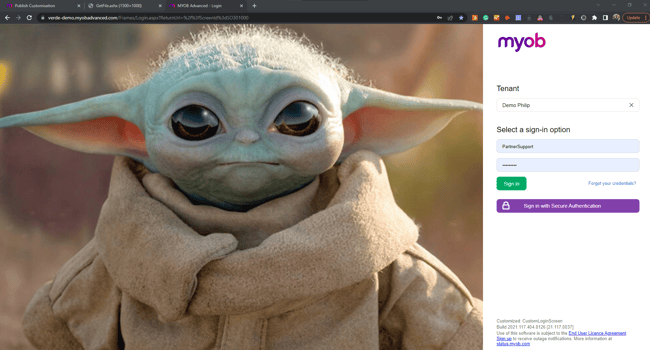
Do you want to customise the login screen to see custom images that are related to your own company? You can replace the standard image files with your own custom pictures to suit your internal branding by publishing a customisation project in MYOB Acumatica.
- The first step is to navigate to the Site Preferences in menu path [System Management > System Preferences > Site Preferences] and upload your background image of choice. (make sure your image has the dimensions 1500px X 1000px)

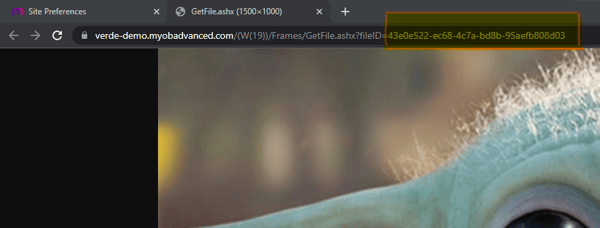
- Once your image is uploaded, open the image and you will need the file ID of that image for the next step.
- To change the background image for the MYOB Acumatica login screen, you will need to create a customization. Always ensure to check with your Consultant before publishing customisations.
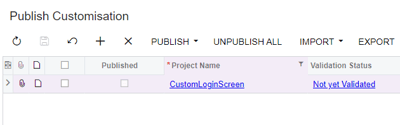
- Navigate to Publish Customisation (Customization > Profiles > Publish Customization)
- Create a new Customisation by clicking on the "+" and save
- Once the customization is created open it and choose the option [File \ Edit Project XML] as shown below.
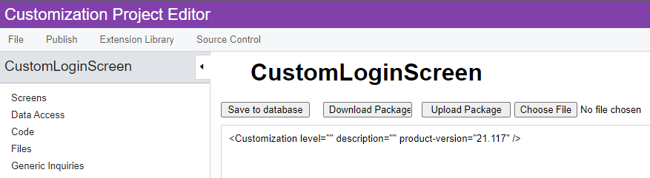
- In the new screen that appears you need to modify the line below with the correct File ID and paste the modified line to the second line of the XML as shown below.
<Customization level="" description="" product-version="21.113">
<File AppRelativePath="Icons/login_bg10.jpg" FileID="43e0e522-ec68-4c7a-bd8b-95aefb808d03" />
</Customization>
You will need to do this for all the image files that are currently saved, ie login_bg1 to 14 if you would like to always show your image. Alternatively, you can upload 14 different variations of your own images.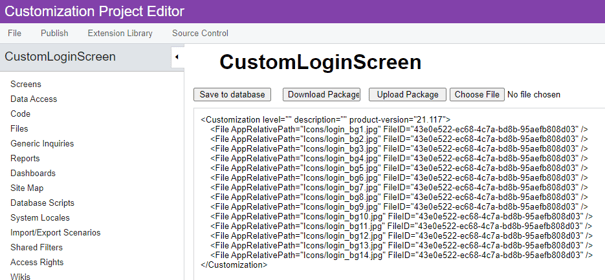
Save to database and publish your customization. (your images may disappear when a new upgrade is released, if this happens you will have to update and publish your customization again)
Your login screen for MYOB Acumatica will now be customised with your own image as shown below.