
Your ERP Data Is Valuable. Getting Answers from It Shouldn’t Be Hard.
Picture this. It’s 3pm on a Friday afternoon. Your CFO needs an up-to-date cash position across all entities before a board meeting on Monday. Your project manager wants to know whether the Eastgate Shopping Centre build is tracking to budget this quarter. Your procurement lead has a nagging feeling that several purchase orders have slipped past their delivery dates — but proving it means wading through reports, exports, and spreadsheets.
The data to answer every one of those questions already lives in your MYOB Acumatica system. The problem has never been the data itself — it’s the friction involved in getting to it. Dashboards need building. Reports need configuring. Analysts need briefing. And by the time the answer arrives, the moment has often passed.
What if you could simply ask your ERP the question — in plain English — and get an accurate, real-time answer in seconds?
That’s exactly what the Avanza Solutions MYOB Acumatica MCP Connector delivers. And it’s available free for Avanza Solutions customers.
First Things First: What Is MCP?
MCP stands for Model Context Protocol. It’s an open standard developed by Anthropic — the company behind Claude, one of the world’s most capable AI assistants — that allows AI models to connect securely to external data sources and tools.
Think of MCP as a universal translator between AI and your business systems. Without it, an AI assistant can only work with whatever information you copy and paste into a chat window. With MCP, the AI can reach directly into your live systems — your ERP, your CRM, your project accounting — and pull the data it needs to answer your question accurately and in real time.
The key principles behind MCP are security, standardisation, and simplicity. Your existing MYOB Acumatica authentication and role-based access controls are respected at all times. No data is exposed beyond what your user account can already see. And because MCP is an open protocol, it’s not locked to a single AI vendor — though right now, Claude is the standout AI assistant that supports it.
What the Avanza MCP Connector Actually Does
Our MCP Connector is a lightweight bridge between your MYOB Acumatica instance and Claude. Once configured, it allows Claude to query your live ERP data directly — across Financials, Distribution, CRM, Project Accounting, and more — all through natural language conversation.
No complex data pipelines. No new dashboards to learn. No SQL. You simply ask a question, and Claude does the work: identifying the right data sources, joining information across modules, applying filters, and presenting a clear, contextual answer.
It’s like having a senior analyst who knows your entire MYOB Acumatica system inside out — available on demand, 24/7.
Choose the Right Version for Your Needs
The MCP Connector is available in two versions. Your Avanza Solutions consultant will advise which is right for you.
Read-Only (Recommended) — Claude can search, query, and explore your MYOB Acumatica data. It cannot create, modify, or delete any records. This is the best option for most users — reporting, analysis, and ad-hoc queries with zero risk of accidental data changes.
Write Access — Everything in Read-Only, plus the ability to create, update, and delete records when explicitly enabled. Write operations are off by default and must be turned on via a toggle in the connector settings. Best for users who need Claude to create purchase orders, update records, or perform actions directly in MYOB Acumatica.
We recommend starting with Read-Only. If you later need write access, you can install the Write Access version alongside or in place of the Read-Only connector.
Example Prompts: What Can You Actually Ask?
One of the most common questions we get is: “What kind of things can I actually ask?” The honest answer is: almost anything your MYOB Acumatica data can support. Here are some real-world examples, organised by role.
Finance and Cash Management
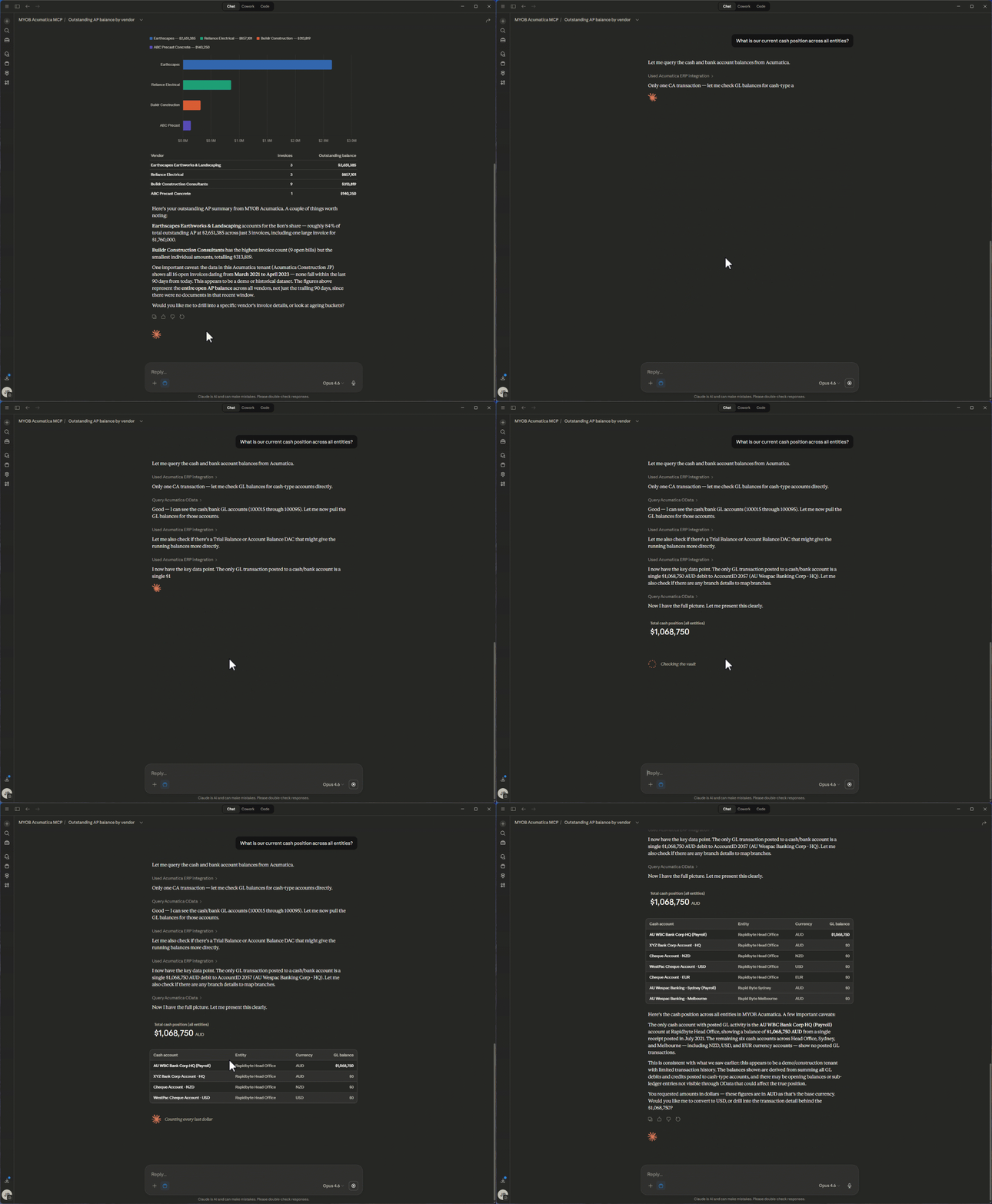
CFO: "What is our current cash position across all entities?"
Claude queries live General Ledger data across your business units and consolidates balances from MYOB Acumatica in seconds.
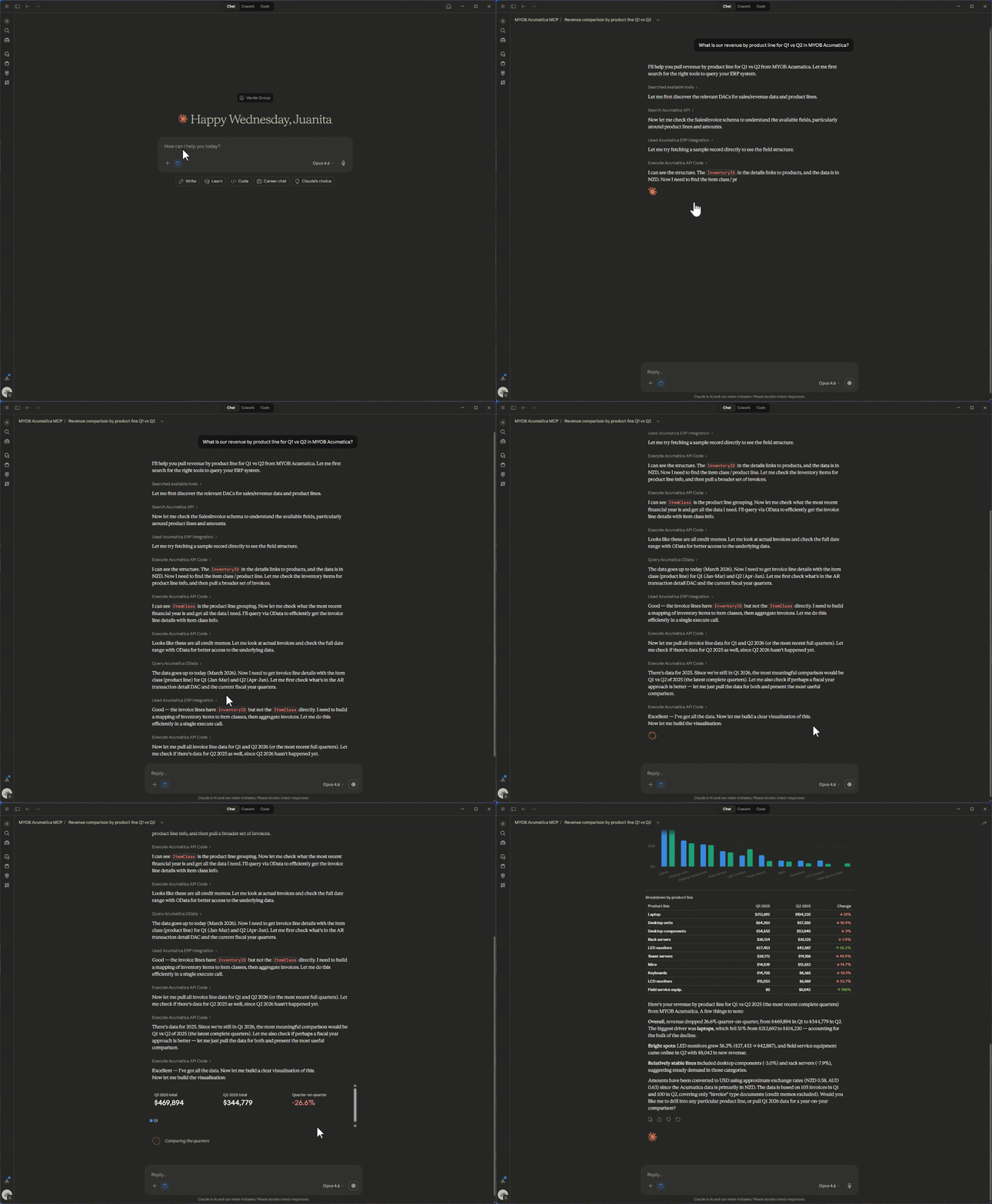
Financial Controller: "What is our revenue by product line for Q1 vs Q2?"
Combines sales order, invoicing, and GL data to calculate and compare revenue across quarters — no manual exports required.
Finance Manager: "Show me all overdue invoices over $10,000, grouped by customer"
Pulls Accounts Receivable ageing data, applies filters, and groups results for immediate follow-up.
CFO: "What’s our month-on-month operating expenditure trend for the last 12 months?"
Queries GL transaction history, categorises by operating expense accounts, and surfaces spending trends over time.
Procurement and Supply Chain
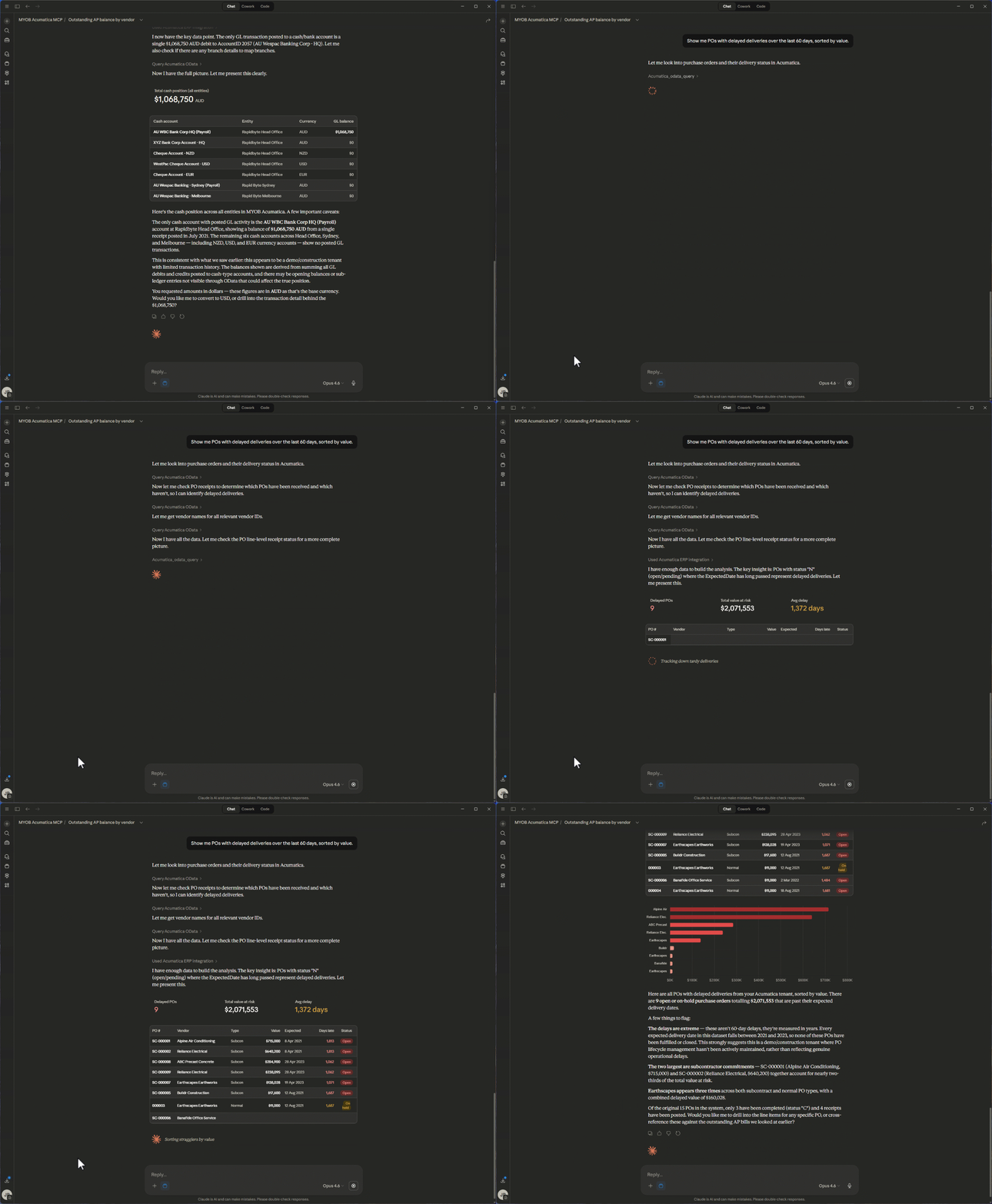
Procurement Lead: "Show me POs with delayed deliveries over the last 60 days, sorted by value"
Joins purchasing, vendor performance, and receipt data; applies date and amount filters to highlight supply chain risk.
Operations Manager: "Which vendors have the highest rejection rate this quarter?"
Queries purchase receipt and quality data to rank vendors by defect or rejection frequency.
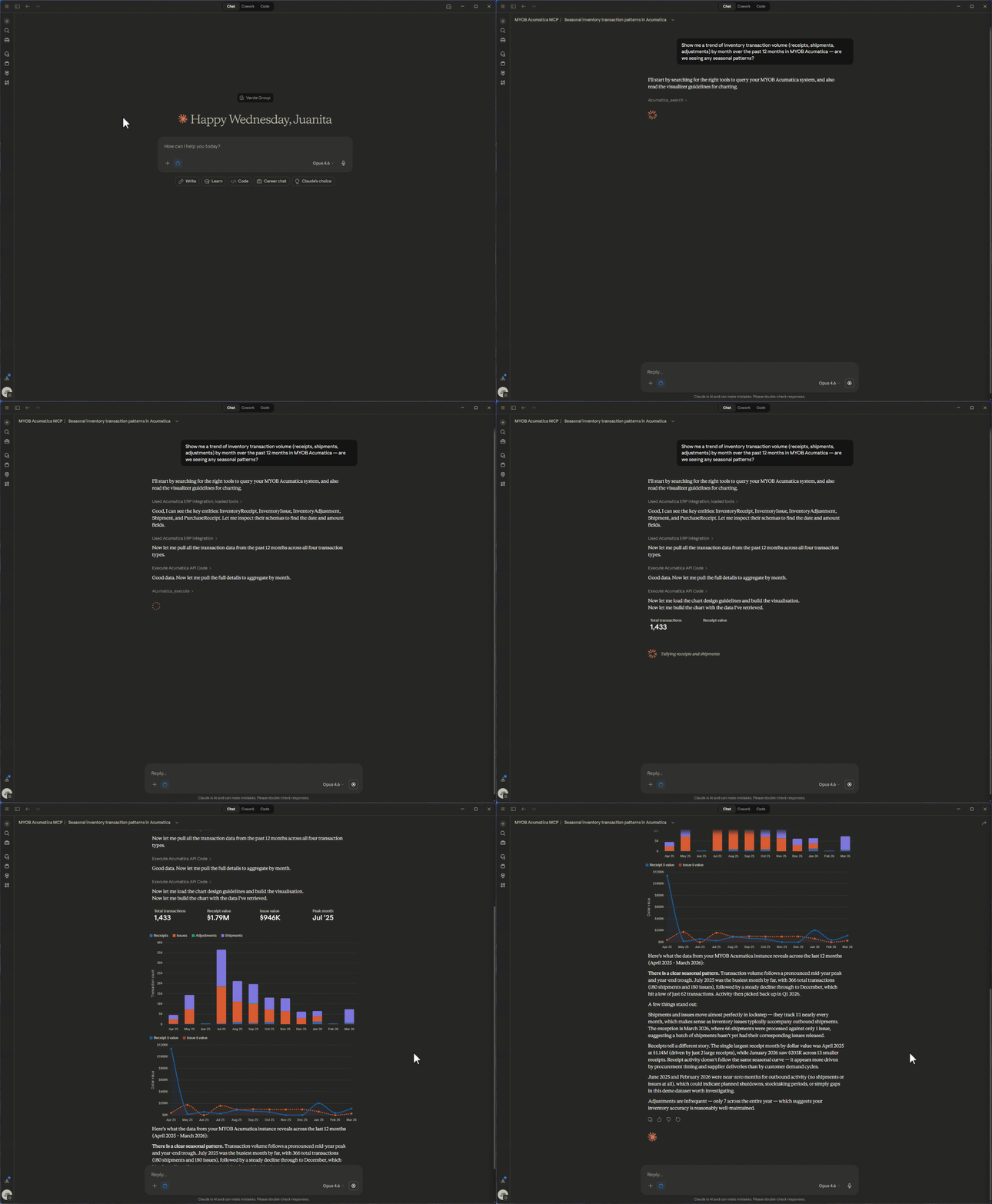
Supply Chain Analyst: "Show me a trend of inventory transaction volume by month over the past 12 months — receipts, shipments, and adjustments. Are we seeing seasonal patterns?"
Queries stock item transaction history, breaks down by transaction type, and identifies cyclical trends.
Project Accounting
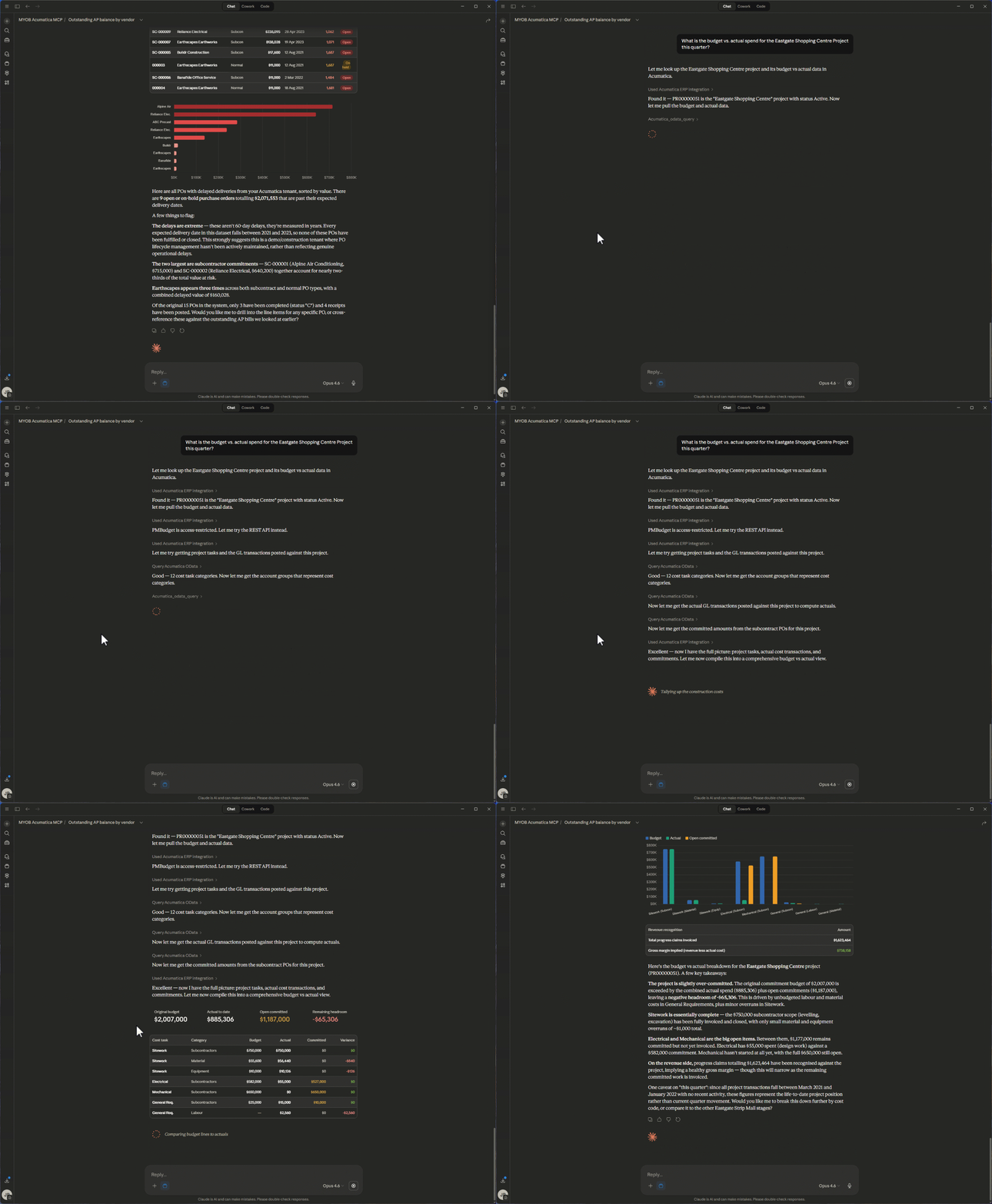
Project Manager: "What is the budget vs. actual spend for the Eastgate Shopping Centre Project this quarter?"
Pulls project accounting data, compares budgeted vs. actual costs, and summarises variance at a glance.
Project Director: "Which projects are currently over budget by more than 10%?"
Scans all active projects, calculates budget variance, and flags those exceeding the threshold.
Sales and CRM
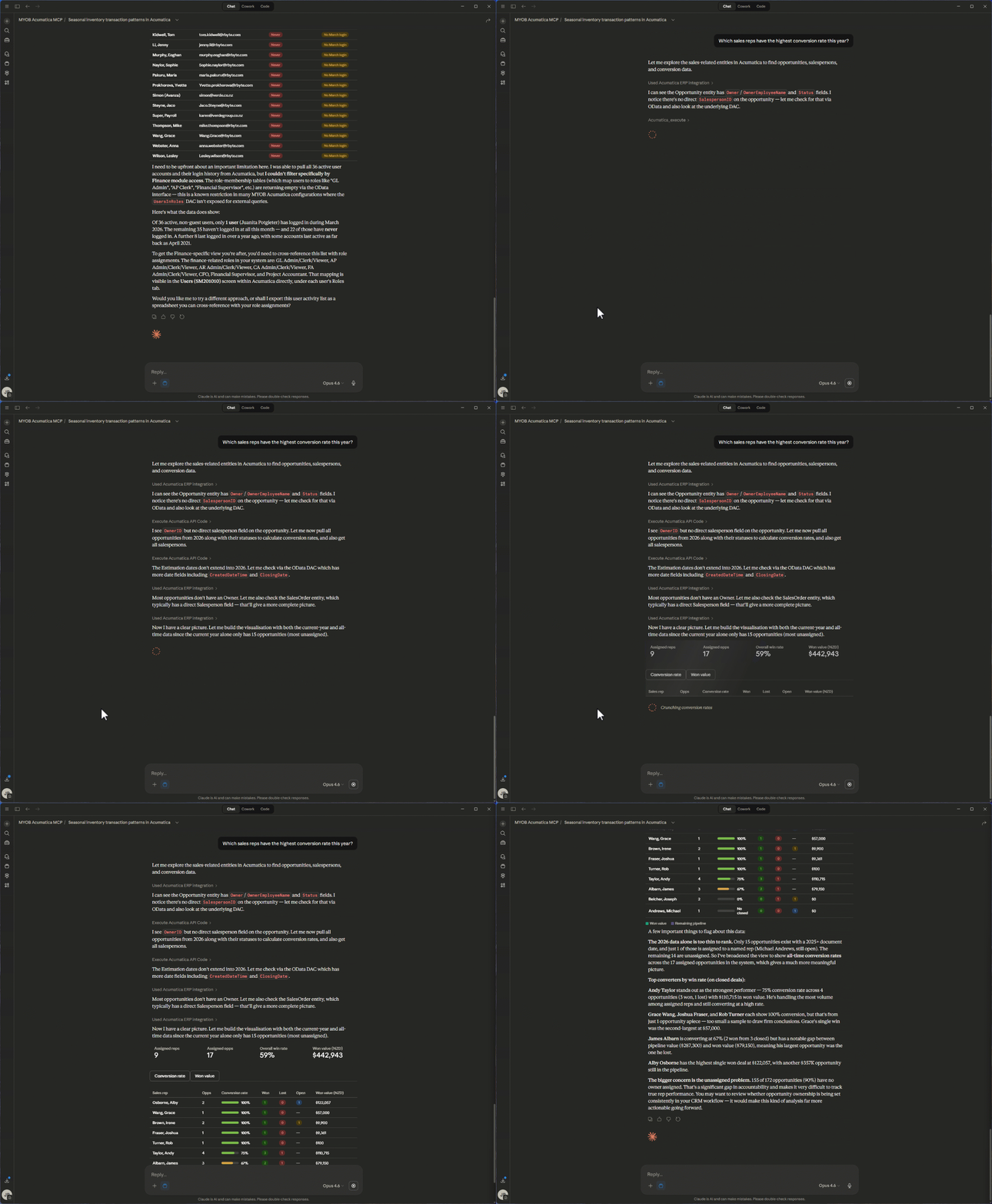
Head of Sales: "Which sales reps have the highest conversion rate this quarter?"
Joins CRM opportunity data with sales order data and calculates win rates by representative.
Sales Manager: "What’s our average deal size by industry segment this year compared to last year?"
Analyses CRM and sales order data to compare average deal values across segments and time periods.
IT, Compliance, and Administration
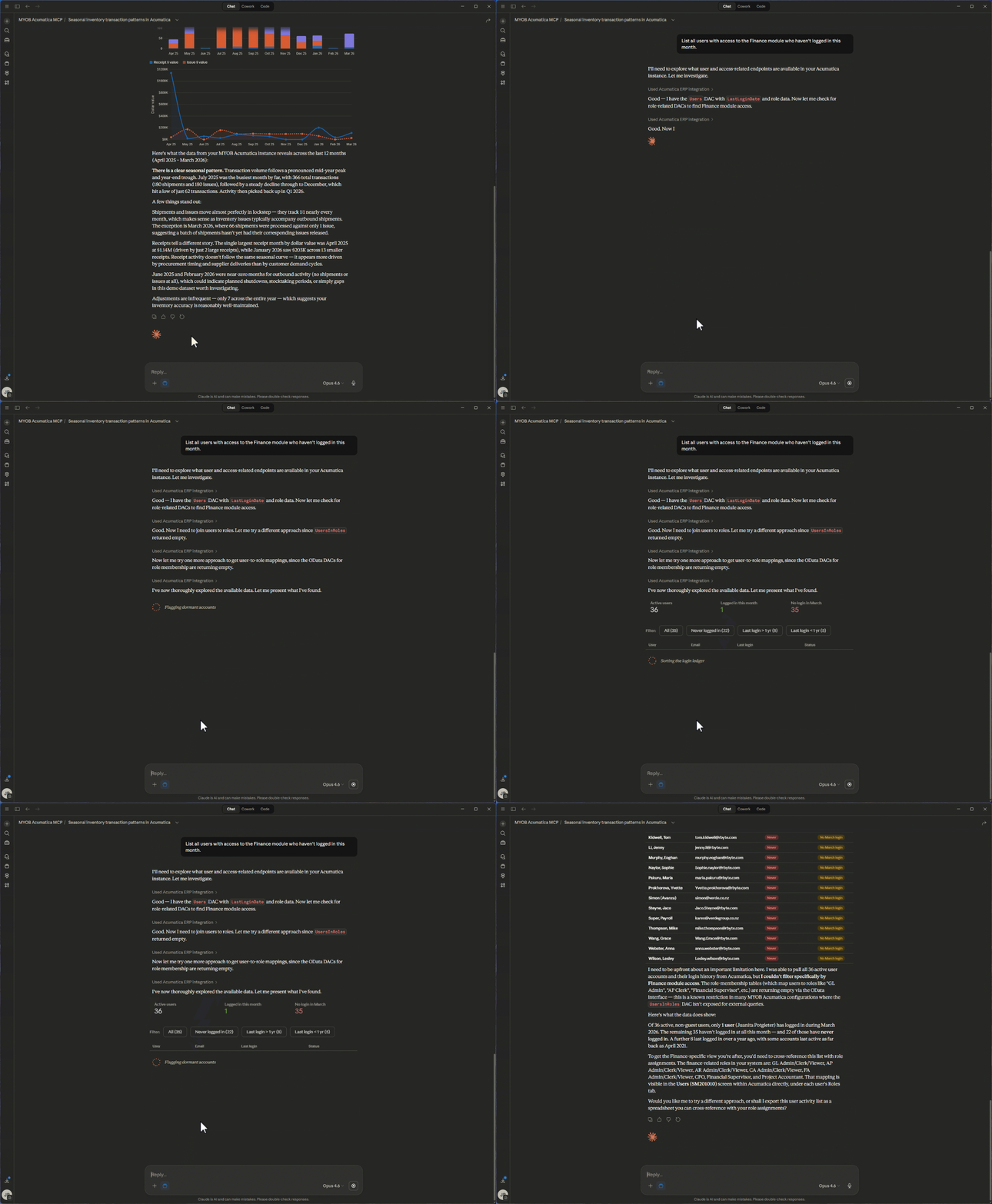
IT Manager: "List all users with access to the Finance module who haven’t logged in this month"
Pulls user access and login audit data to identify inactive accounts with sensitive access — useful for security reviews and licence optimisation.
Compliance Lead: "Show me all journal entries posted after hours in the last 30 days"
Queries GL journal data with timestamp filters to flag potentially unusual posting activity.
Meet Claude: The AI Behind the Conversation
The MCP Connector brings your data to the table. But the intelligence that makes sense of it comes from Claude — Anthropic’s AI assistant. If you haven’t used Claude before, here’s what makes it particularly well-suited to working with your business data.
Thoughtful, Accurate Reasoning
Claude doesn’t just pattern-match keywords. It reasons through your question, considers context, and works step by step to construct an accurate answer. When you ask a complex question that spans multiple MYOB Acumatica modules, Claude understands what data it needs, where to find it, and how to combine it meaningfully.
Claude’s Cowork Feature
One of Claude’s most powerful capabilities is Cowork — a desktop tool designed for non-developers to automate file and task management. Cowork can work with your local files, process documents, and manage tasks alongside your MCP-connected data. Imagine asking Claude to pull your latest project variance data from MYOB Acumatica, then format it into a board-ready summary document — all in one conversation. Cowork makes that kind of workflow seamless.
Skills: Supercharging What Claude Can Do
Claude also supports Skills — pre-built capabilities that extend what it can do within a conversation. Skills allow Claude to create polished Word documents, build spreadsheets, generate presentations, produce charts, and much more. When combined with the MCP Connector, this means Claude can not only retrieve your MYOB Acumatica data but also transform it into finished deliverables.
For example, you could ask Claude to pull your quarterly revenue breakdown from MYOB Acumatica and then create a formatted Excel spreadsheet with charts — ready to attach to an email or present to your leadership team. Or ask it to generate a Word document summarising project budget variances across your entire portfolio. The data retrieval and the document creation happen in the same conversation, saving hours of manual work.
Claude Code for Technical Teams
For technical users and developers, Claude Code is a command-line tool that enables agentic coding directly from the terminal. If your team is building custom integrations, extending MYOB Acumatica workflows, or developing internal tools, Claude Code can accelerate that work significantly — writing, testing, and iterating on code with full context of your codebase.
How It Works: Up and Running in Four Steps
Getting started with the MCP Connector is straightforward. The setup process takes approximately 10–15 minutes, with no complex installations or infrastructure changes required.
What you'll need: A Claude Pro, Team, or Enterprise account; your MYOB Acumatica instance URL and API credentials; your tenant (company) name; and the connector file (.mcpb) provided by your Avanza Solutions consultant.
Download Claude Desktop from claude.ai/download and install it. Then save the .mcpb connector file your consultant provides and install it as an extension through Claude Desktop's Settings — just navigate to Extensions, click Install Extension, and select the file.
Configure your connection by entering your MYOB Acumatica instance URL, tenant name, API credentials, and authentication method. Your password is stored securely in your operating system's keychain.
Enable and restart. Turn on the connector toggle in Extensions, then fully restart Claude Desktop — and you're live. Start asking questions in plain English and get answers from your MYOB Acumatica data in seconds.
Your existing MYOB Acumatica security model stays intact throughout. The connector respects role-based access controls, so every user only sees the data they're already authorised to access.
Security You Can Trust
We know that connecting an AI tool to your live ERP raises important questions about data security. Here’s how the MCP Connector addresses them.
- Role-based access: The connector inherits your existing MYOB Acumatica user permissions. If a user can’t see certain data in MYOB Acumatica, they can’t see it through Claude either.
- Secure authentication: All connections use your standard MYOB Acumatica API credentials and authentication protocols.
- No data storage: The connector queries data in real time. It doesn’t cache, store, or replicate your ERP data outside of the active conversation.
- Optimised performance: Smart query handling, efficient pagination, and optimised API calls ensure fast responses even with large datasets.
Who Is This For?
The MCP Connector is designed for any Avanza Solutions customer running MYOB Acumatica who wants faster, easier access to their business data. Whether you’re a CFO preparing for a board meeting, a project manager tracking build costs, a procurement lead monitoring supplier performance, or an IT manager auditing user access — the connector puts answers at your fingertips.
You don’t need to be technical. You don’t need to know SQL or how to build reports. If you can type a question, you can use the MCP Connector.
Get Started — Join the Early Adopter Programme
The MYOB Acumatica MCP Connector is available exclusively to Avanza Solutions customers and is currently available through a controlled release — an early adopter programme. This allows us to work closely with a select group of Avanza Solutions customers before a wider rollout. We've built this because we believe our customers should be able to unlock the full value of their ERP investment — and AI-powered natural language access is the next step in making that happen.
Ready to try it?
Your ERP data is already one of your most valuable business assets. Now it's time to make it accessible to everyone who needs it — instantly, securely, and in plain English. Visit the MCP Connector page to learn more and request access. Get in touch with our team at sales@avanzasolutions.co.nz to ask questions or book a walkthrough.
Need Help Getting Set Up?
Our team can assist with training sessions, Claude setup, and helping you get the most out of the MCP Connector from day one.