
Two of the manufacturing changes in MYOB Acumatica 2026R1 go directly to the accuracy of your production costs. Operation and labour time is now captured, stored and costed to the second rather than the minute, which matters on any line where a single unit takes seconds to process. Cost variances caused by negative inventory now post to a dedicated WIP variance account instead of distorting true production cost. Alongside those, stock in transit counts as planned supply, work centres can be grouped into departments, and purchase receipts can be corrected on sites running manufacturing. The Shop Floor Kiosk is also on the way, arriving in a subsequent minor release rather than at general availability.
Precision in every second
If you run a high speed or automated line, this is the headline. Plastic moulding, food and beverage packaging, electronics assembly and similar operations run individual operations in seconds, not minutes.
Recording that work in whole minutes forces a rounding decision on every transaction, and those roundings compound through labour costing until the reported cost of a run no longer resembles what happened on the floor.
From 2026R1, MYOB Acumatica supports entering, recording, storing and reporting time in seconds across production, labour and machine processes. The Operation Time Format and Total Time Format settings on BOM Preferences (AM101000) now include formats with seconds, and choosing one displays second level precision across the bill of material, production order, estimate, labour and cost rollup forms and reports.
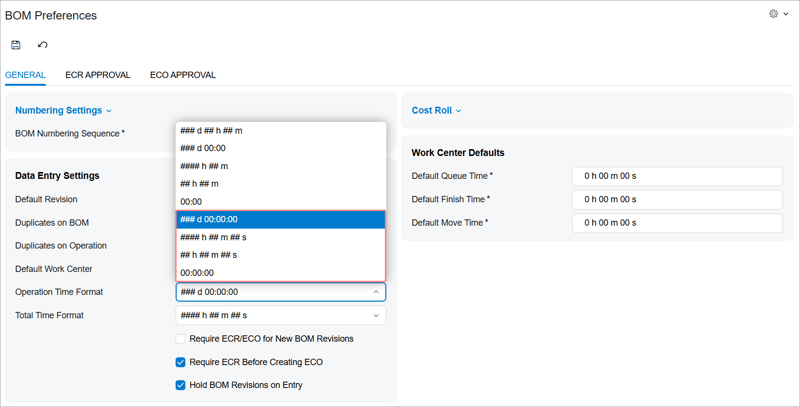 Two details worth knowing.
Labour is always in seconds regardless of your display format. Clock Entry (AM315000), Multiple Production Clock Entry (AM316000), Approve Clock Entries (AM516000) and Scan Labor (AM302020) all record and process in seconds. If you have selected a minute based format, labour displays in minutes on the production order forms but the system still stores and calculates in seconds underneath. Seconds are hidden, not rounded.
Costing follows the stored value. All manufacturing time data is now stored in the database in seconds, so labour costs, machine costs and production order cost rollups use the exact operating time. Your chosen format controls display only.
One exception: on Create Labor Time Activities (AM513000), labour time is rounded to whole minutes when activities are created, and times between 0 and 29 seconds display no value. That reflects how employee time activities work generally.
For anyone who has tried to reconcile a standard cost against actual production on a fast line, the shift from minutes to seconds is the difference between a variance you can explain and one you cannot.
Reliable costing when inventory goes negative
Here is the problem this solves. You issue materials to a production order, the issued quantity exceeds what is on hand, and the stock balance goes negative. The system values that issue at the item's current cost. New stock then arrives at a different cost, and the cost used for the issue no longer matches the receipt.
Depending on how that difference is handled, your work in progress values drift away from the general ledger. The result is misreported actual production costs, awkward reconciliations and confusion at month end.
From 2026R1, cost variances caused by negative inventory post to a dedicated WIP Variance Account, while true production costs continue posting to the regular WIP Account. Both are set on the References tab of Production Order Maintenance (AM201500). The variance account is used when posting journal transactions that offset negative inventory arising from receipts, issues, adjustments, transfers or kit assemblies.
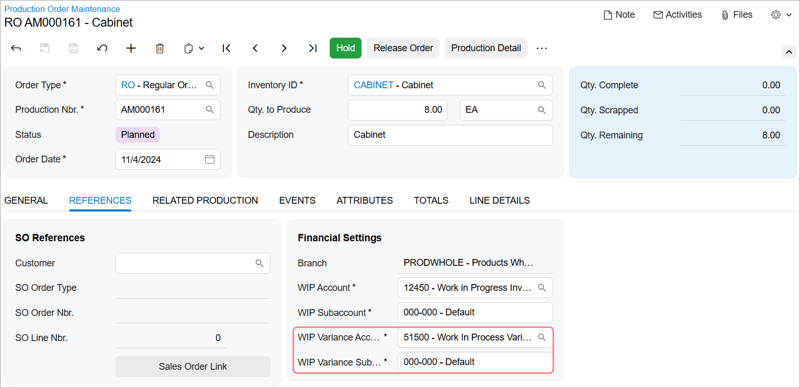
This only arises where the Allow Negative Quantity check box is selected on Item Classes (IN201000) for the item class concerned, which is a common setting in plants where receipt paperwork lags the pallet and materials have to be issued before the receipt is entered.
If that describes your operation, set up the variance account before you start issuing materials in the new version. Getting the account structure right first avoids a cleanup later.
Visibility into stock that is still moving
When goods are on the road, at sea or between your own warehouses, they should still appear in supply plans and material requirements calculations. Until now they did not, and the consequences were predictable: duplicate replenishment orders raised because planning did not recognise stock already dispatched, unnecessary purchases when confirmed transfer orders were invisible, and delayed partial shipments through poor visibility into partial fulfilment.
From 2026R1, inventory planning includes in transit quantities as part of planned supply, even where the two step transfer has not yet started. Each time planning runs on Regenerate Inventory Planning (AM505000), the calculation for the destination warehouse includes transfer type sales orders whose related shipments have been confirmed, meaning goods have left the source warehouse.
A new Inventory Planning Results by Item (AM404000) form shows the detail: transfer orders, shipments, transfer lines and transfer receipts. Promise dates include the transfer lead time, and where multiple items ship together the system applies the longest lead time.
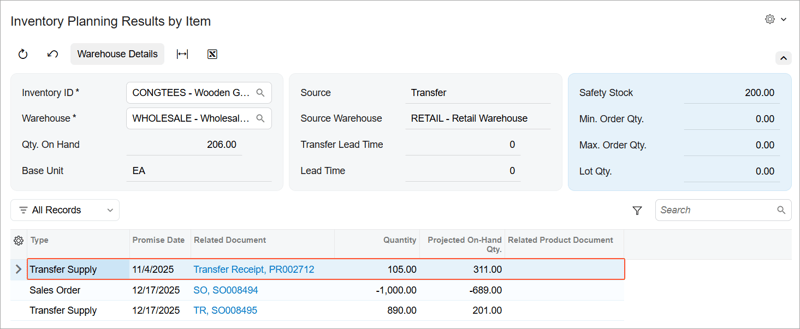
Requires Multiple Warehouses plus either Material Requirements Planning or Distribution Requirements Planning.
For a New Zealand manufacturer running a North Island plant and a South Island distribution point, or importing components with long transit times, this closes a gap that has historically been filled by a planner's memory and a spreadsheet.
Group work centres by production area
In a busy plant you often want to look at resources by production area rather than reviewing each work centre one at a time.
A new Manufacturing Departments (AM217000) form lets you create departments for a specific warehouse, each representing a broad production area such as welding or assembly, and maintain the list of assigned work centres. You can assign from either end, either adding work centres to a department or setting the department on the Work Centers (AM207000) form.
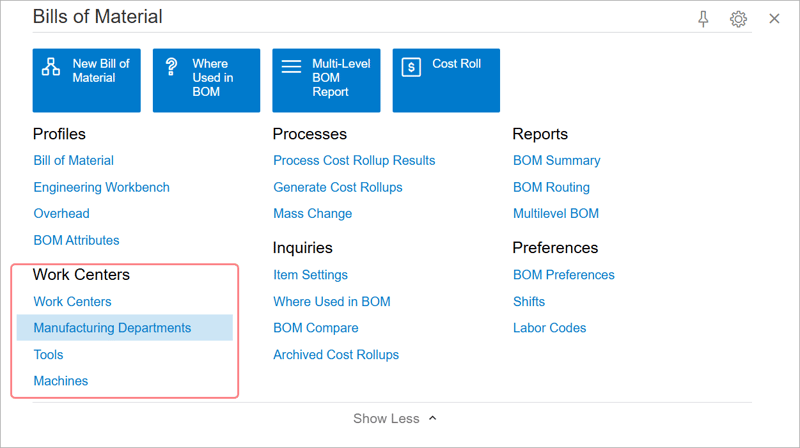
A new list view shows all departments, a new column on the work centres list lets you filter by department, and the Bills of Material workspace gains a Work Centers category grouping the related forms.
Understand the limitation before you plan around it. In this release, manufacturing departments are not yet used in production reporting, planning or scheduling. They are an organisational and visibility layer. You can use them in custom generic inquiries and dashboards for more granular analysis, which is genuinely useful, but they do not yet drive capacity planning.
Correct a receipt without a workaround
The ability to correct or cancel a released purchase receipt arrived in an earlier release, but was unavailable whenever the Manufacturing feature was enabled. That restriction has been relaxed.
From 2026R1 the Correct Receipt and Cancel Receipt commands on Purchase Receipts (PO302000) are available on sites running manufacturing. The safeguard is a check that prevents their use where at least one receipt line is linked to a production order material, which gives a clear separation: flexibility for non production receipts, strict protection for anything touching a production order.
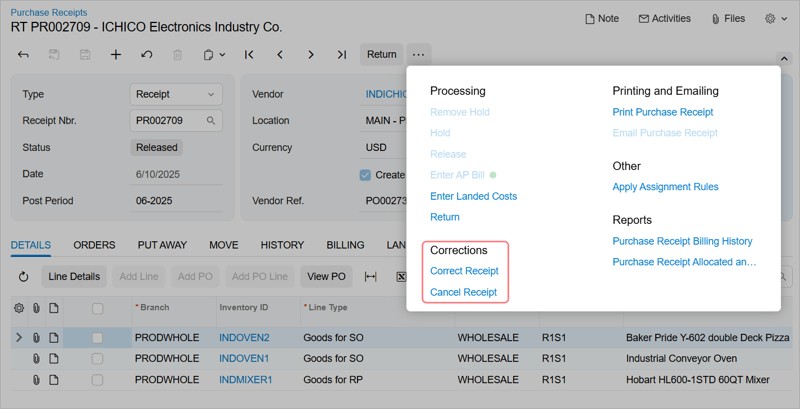
For a manufacturer processing high volumes of receipts, where errors surface only after release, this removes a real workaround burden. Requires the Inventory feature.
What is coming later in 2026R1
Not everything in this release arrives at once, and the addition most likely to change day to day life on the floor is landing in a subsequent minor release rather than at general availability.
Shop Floor Kiosk. Production staff clock on, record output and track job progress from a simple kiosk interface on the shop floor, giving real time visibility into production as it happens. For a plant currently running paper job cards or a spreadsheet at the supervisor's desk, this closes the gap between what is happening on the line and what the system knows about it.
We will cover the Shop Floor Kiosk in more detail once it is available. If it is likely to matter to your operation, it is worth factoring into your upgrade planning now rather than treating it as a later project.
Where to start
If you run high speed production, the move to second level time storage justifies looking at this release on its own. Check your time format settings after the upgrade and decide whether you want seconds displayed or simply stored and costed.
If you operate with negative quantities allowed on any item class, get the WIP variance account in place before materials start moving.
And if you run inter warehouse transfers with in-transit visibility managed outside the system, test the planning change against a real replenishment cycle before you retire the spreadsheet.
Book a conversation if you would like help planning your upgrade.
Frequently asked questions
Can MYOB Acumatica track manufacturing time in seconds? Yes. From MYOB Acumatica 2026R1 the system supports entering, recording, storing and reporting time in seconds across production, labour and machine processes. The Operation Time Format and Total Time Format settings on BOM Preferences (AM101000) include formats that support seconds. Labour time is always recorded and processed in seconds on the clock entry and scan labour forms regardless of the selected format, and all manufacturing time data is stored in seconds, so labour costs, machine costs and cost rollups are calculated with second level precision even when displayed in minutes.
What is the WIP Variance Account in MYOB Acumatica? The WIP Variance Account is a dedicated general ledger account introduced in MYOB Acumatica 2026R1 for cost variances caused by negative inventory. When materials are issued to a production order in excess of the on hand quantity and stock later arrives at a different cost, the resulting variance posts to the WIP Variance Account while true production costs continue posting to the regular WIP Account. Both accounts are set on the References tab of Production Order Maintenance (AM201500). This applies only where the Allow Negative Quantity check box is selected for the item class.
Does MYOB Acumatica include in transit stock in inventory planning? Yes. From 2026R1 inventory planning includes in transit quantities as part of planned supply, even when a two step transfer has not yet started. When planning runs on Regenerate Inventory Planning (AM505000), the calculation for the destination warehouse includes transfer type sales orders whose related shipments have the Confirmed status. The new Inventory Planning Results by Item (AM404000) form shows the planned transfer supply detail.
Is the Shop Floor Kiosk available in MYOB Acumatica 2026R1? The Shop Floor Kiosk is arriving in a subsequent minor release of 2026R1 rather than at the initial general availability. It gives production staff a simple kiosk interface on the shop floor to clock on, record output and track job progress, providing real time visibility into production as it happens. Speak to your implementation partner about timing and what it would involve for your plant.
What are manufacturing departments in MYOB Acumatica? Manufacturing departments group work centres by production area, such as welding or assembly, within a warehouse. They are created on the new Manufacturing Departments (AM217000) form in MYOB Acumatica 2026R1. In this release manufacturing departments are not yet used in production reporting, planning or scheduling, but they can be used in custom generic inquiries and dashboards for more granular production analysis.
View the full MYOB Acumatica 2026R1 Release notes
Avanza Solutions is a dedicated MYOB Acumatica implementation partner based in New Zealand, working extensively with manufacturers. This article summarises publicly available MYOB release documentation. Feature availability depends on your edition, licensing and enabled features.