
The distribution changes in MYOB Acumatica 2026R1 target the places where warehouse work actually breaks down. Inventory adjustments can now require approval, so write offs carry a name against them. Shipping paperwork prints automatically when a shipment is confirmed. Staff receive a recommended putaway location as they scan goods in. Batch pick lists keep moving through a shortage instead of stalling. On the commerce side, BigCommerce B2B companies can be imported and Shopify draft orders sync as sales quotes.
Put a name against every adjustment
If you have ever had to explain an unexplained write off at month end, this is the change to read first.
Inventory adjustments are now part of the standard approval workflow. You create an approval map on the Approval Maps (EP205015) form using the new Adjustments entity type and apply it on a new Approval tab in Inventory Preferences (IN101000), optionally with a notification template so approvers know there is something waiting.
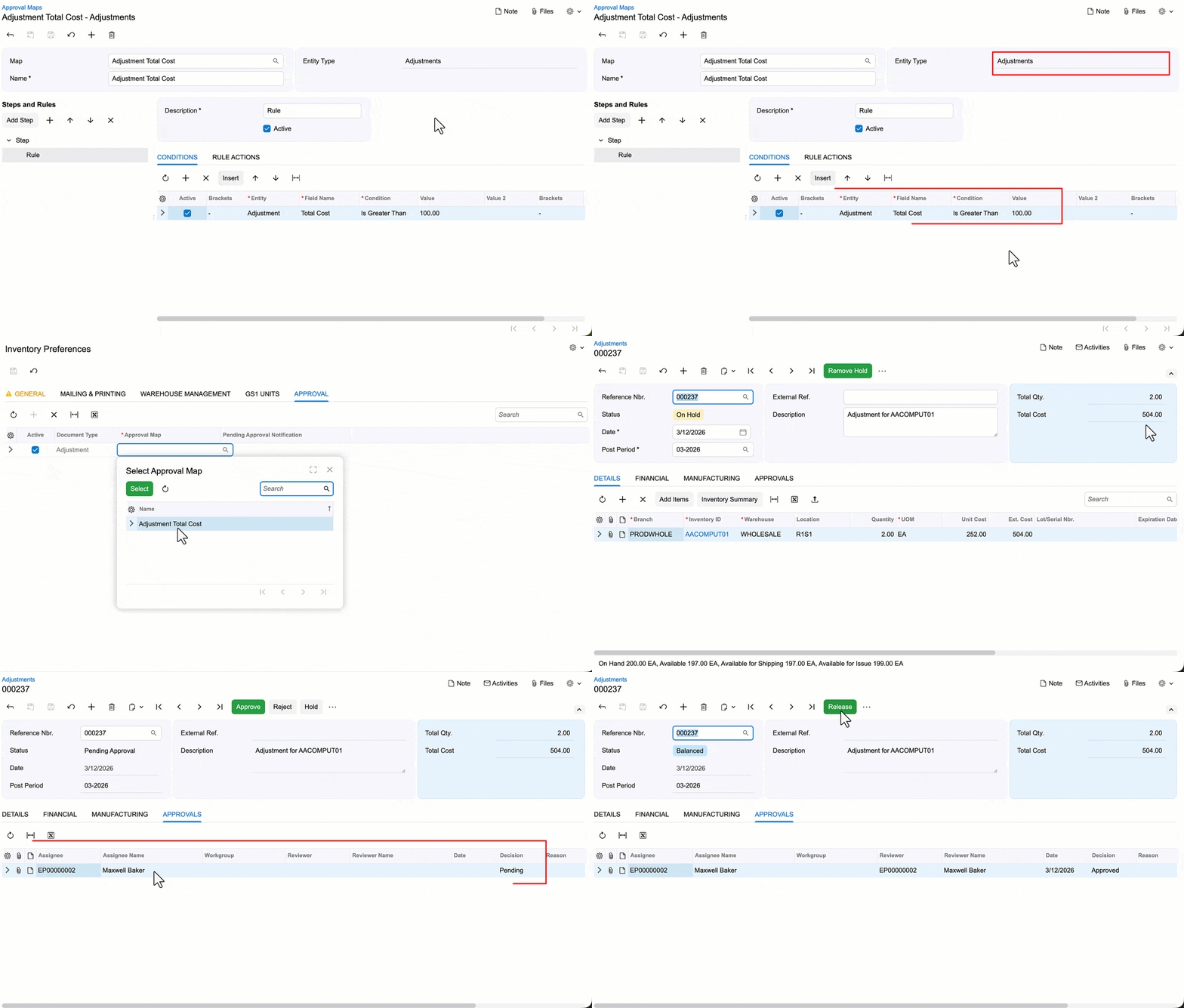
Manually created adjustments then start on hold. When taken off hold, the system decides whether approval is required and moves the adjustment to Pending Approval with the required approvers named. System generated adjustments are covered too: if one falls within the scope of the map it is created pending approval, and if it does not meet the criteria it follows the normal workflow.
Multiple adjustments can be approved together on the Approvals (EP503010) form. Requires the Approval Workflow and Inventory features.
This changes the month end conversation from forensic to preventive, which is usually worth more than the time it saves.
One less step at the shipping desk
Shipping labels, shipment confirmations and commercial invoices can now print automatically when a shipment is confirmed on the Shipments (SO302000) form, rather than requiring a separate set of clicks.
Three check boxes on Sales Orders Preferences (SO101000) control it. Where they appear depends on whether the Fulfillment feature is enabled, sitting either on the Warehouse Management tab or the General tab.
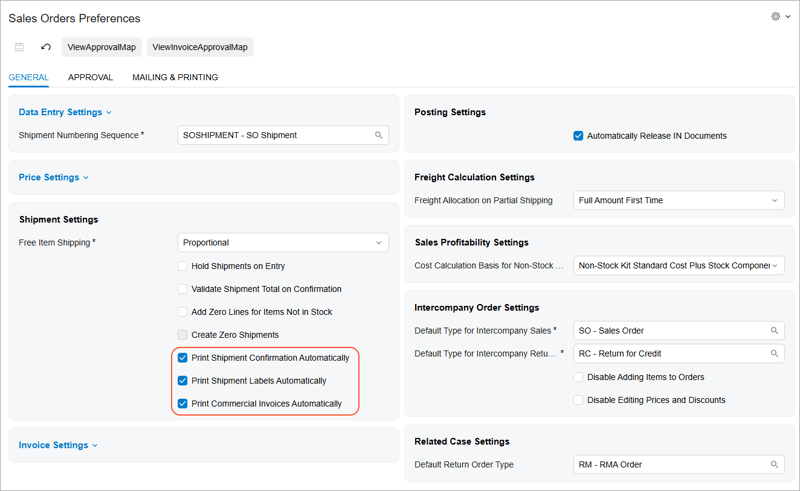
Printing goes through DeviceHub, so that needs to be installed with printers configured and a default printer specified for the relevant users, branch or company. DeviceHub itself gains improved print queue management and support for the contract based API in this release.
The wider benefit is consistency. Teams working on the Shipments form and teams working on Pick, Pack, and Ship (SO302020) now get the same behaviour, which cuts the training burden when people move between roles.
Guide the putaway as goods arrive
Directed putaway arrived in the previous release. 2026R1 extends it to the moment of receipt, which helps warehouses that do not route everything through a single staging area first.
Once configured, scanning an item's barcode in Receive mode on the Receive and Put Away screen prompts the worker with a recommended location, taken from the Default Putaway To setting on Item Warehouse Details (IN204500) or the stock item. The worker can scan the recommended location to put the item away immediately, or scan a different one to route it to staging.
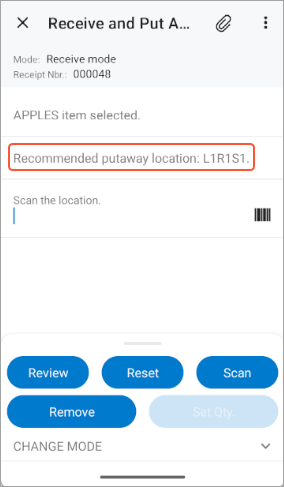
The recommendation guides rather than forces, which is usually the right balance on a busy dock. Setup requires selecting Request Location for Each Item on Receiving on Purchase Orders Preferences (PO101000) and clearing the single and default receiving location options.
Keep picking through a shortage
Stock levels change faster than pick lists do. When a picker hits a shortage with no alternate location to pick from, the batch previously stopped.
Now you can confirm a short quantity and carry on. The system distributes the picked quantities across the shipments in the worksheet, and only the picked quantities transfer to the sorting location.
To catch the exceptions before packing, a new Non-Shippable check box on the Shipments tab of Picking Worksheets (SO302500) flags picked shipments affected by shipment rules where a shortage exists. That gives the packing supervisor a filterable list rather than a discovery at the bench.
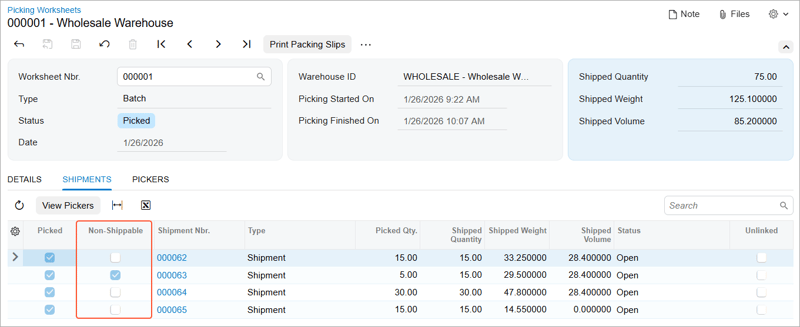
Supported for both paper based and paperless batch picking, and requires the Allow with Warning option in the Short Shipment Confirmation setting plus the Advanced Picking feature.
Related to this, pickers can now change picking locations on the fly during a pick rather than abandoning and restarting.
Traceability without the typing
Some businesses receive items that were never purchased: returned goods, warranty replacements, recovered parts. They still need lot or serial numbers for traceability, and asking a warehouse worker to key them in slows receiving down.
A new setting in Inventory Preferences (IN101000) makes the system generate the number automatically when a new item is scanned on Scan and Receive (IN301020). The item's lot or serial class needs an assignment method of When Received and auto generate next number selected.
For anyone running traceability for food safety, building product compliance or warranty, this removes a real source of receiving friction.
Better planning for kits and requisitions
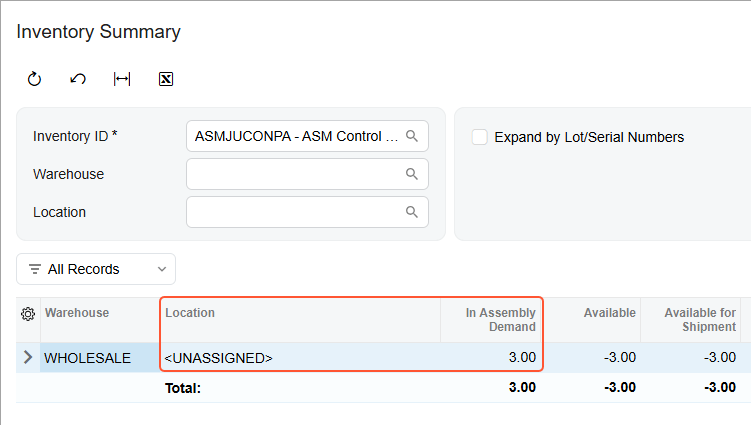
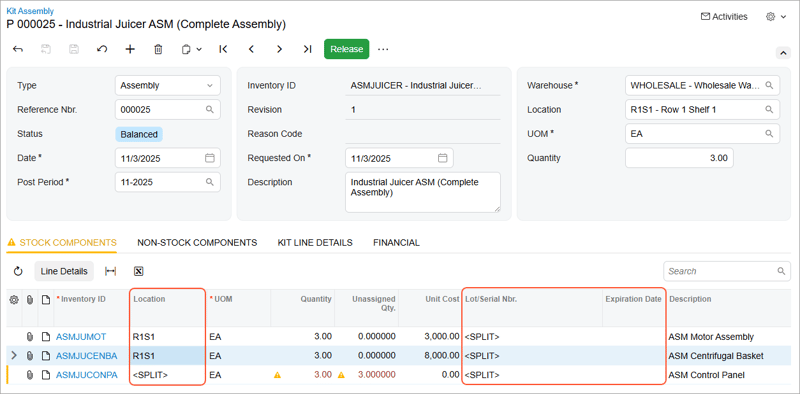
Kit assemblies can now be saved even when some lot or serial tracked components have no location or number yet, so you can prepare transactions ahead of components arriving. New columns on the Kit Assembly (IN307000) form make the gaps visible, and the assembly cannot be released until they are filled. Saving creates demand item plans, which means the components appear in planning rather than being invisible until the paperwork catches up.
Requisitions can now be raised across branches operating different base currencies, which simplifies procurement for group structures.
Non stock items can carry a default purchasing source, so the system fills the source on related purchase orders and requisitions rather than requiring repeated selection.
Rounding out the area, there are refinements to how vendor bills are processed, improvements to the accuracy and visibility of inventory reports, and enhanced logic in the sales order workflow.
Commerce: B2B and Shopify
BigCommerce B2B companies can be imported. The connector now brings across companies from BigCommerce B2B Edition along with their addresses, hierarchies and users. A company becomes a customer with the Organization category, addresses become customer locations, and users become contacts, with the earliest created admin user set as primary contact. Order synchronisation for orders placed on behalf of companies works in both directions.
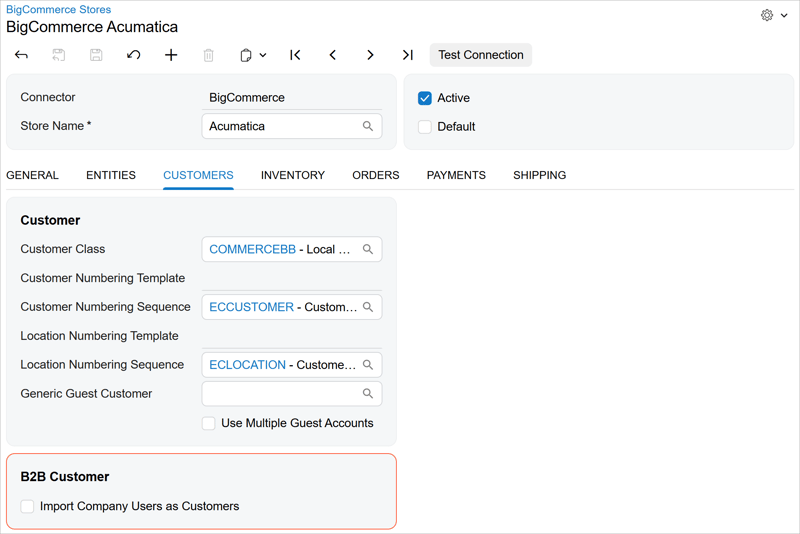
Two things to check first. This is intended for customers who have not yet synchronised B2B company data, so if you already do this through a customisation, MYOB advises staying with your existing implementation for now. And the Company entity remains hidden until your MYOB support provider exposes it.
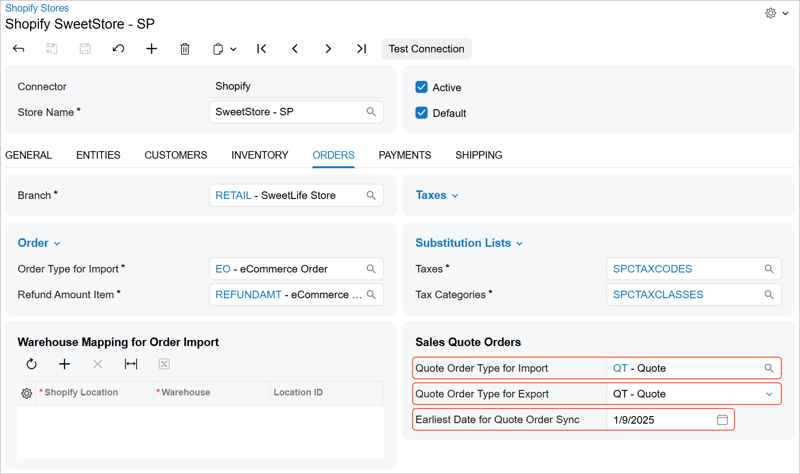
Shopify draft orders now sync as sales quotes. Draft orders are where custom discounts, special shipping rates and flexible invoicing live, which makes them the natural home for bespoke sales. You can import them as sales quotes, export quotes to Shopify as draft orders, or run it bidirectionally. Worth choosing your finalisation workflow deliberately: finalising in MYOB Acumatica tags the Shopify draft order as completed but leaves it open, while finalising in Shopify leaves the MYOB Acumatica quote open with a notification and prevents you copying it to a sales order.
Payment terms mapping has been rebuilt. Shopify payment terms are mapped to credit terms directly in the store settings, replacing the previous substitution list approach, which has been removed. The mappings now apply to draft orders as well as orders and customers. If you rely on the old substitution list, plan the reconfiguration as part of your upgrade.
Store currency is now the default. New stores import orders and related documents in the store currency rather than the payment currency. The relevant setting has been renamed Use Payment Currency instead of Store Currency and remains cleared by default. All currencies in use must be active on the Currencies (CM202000) form.
Marketplace remitted taxes can be captured. Where a marketplace collects and remits tax on your behalf, you can now map each Shopify sales channel to a tax zone and tax ID so those taxes import separately from taxes on regular orders. This supports marketplace orders with tax exclusive item prices only, and there are limitations around partial payments and subsequent tax changes worth reviewing before you rely on it.
Connector mapping is more flexible. Two new keywords, Unmap and DefaultMapping, can be used inside mapping formulas across the Shopify, Amazon and BigCommerce connectors. Unmap explicitly clears a field, and DefaultMapping applies the connector's default behaviour, which makes conditional mapping possible without workarounds.
Finally, a small but useful fix: imported Shopify POS orders that arrive with no customer and no shipping details now have addresses filled from the generic guest customer defined in the store settings.
Where to start
If your month end regularly surfaces adjustments nobody can account for, start with the approval workflow. If your pick and pack team loses time to shortages, the batch picking change is a daily win. And if you run a Shopify store, check the payment terms mapping and the currency default before you upgrade rather than after.
Book a conversation if you would like help working through which of these apply to your operation.
Frequently asked questions
Can you require approval for inventory adjustments in MYOB Acumatica? Yes. From MYOB Acumatica 2026R1 inventory adjustments are part of the approval workflow. You create an approval map on the Approval Maps (EP205015) form using the Adjustments entity type and apply it on the Approval tab of Inventory Preferences (IN101000). Manually created adjustments then start on hold and move to Pending Approval when taken off hold. System generated adjustments that meet the map's criteria are created pending approval. Requires the Approval Workflow and Inventory features.
Can MYOB Acumatica print shipping documents automatically? Yes. From 2026R1 you can turn on automatic printing of shipment confirmations, shipping labels and commercial invoices when a shipment is confirmed on the Shipments (SO302000) form. The settings are on Sales Orders Preferences (SO101000), and printing is handled through DeviceHub, which must be installed with printers configured and a default printer specified.
What happens when there is a shortage on a batch pick list in MYOB Acumatica? From 2026R1 you can confirm a short quantity and keep picking the batch instead of stopping. The system distributes picked quantities across the shipments in the worksheet and transfers only the picked quantities to the sorting location. A Non-Shippable check box on the Shipments tab of Picking Worksheets (SO302500) identifies picked shipments that cannot be packed or shipped.
Can Shopify draft orders sync with MYOB Acumatica? Yes. From 2026R1 you can sync Shopify draft orders as sales quotes, in either direction or bidirectionally. You activate the Sales Quote entity in the Shopify store settings and configure the order types for import and export plus an earliest quote order date. Imported draft orders appear as sales quotes on the Sales Orders (SO301000) form.
View the full MYOB Acumatica 2026R1 Release notes
Avanza Solutions is a dedicated MYOB Acumatica implementation partner based in New Zealand, working with distribution and inventory led businesses. This article summarises publicly available MYOB release documentation. Feature availability depends on your edition, licensing and enabled features, and connector capabilities depend on your ecommerce platform and edition.