
MYOB Acumatica 2026R1 moves AI out of experimental status and into general availability. AI Automation, previously known as AI Studio, is now a production capability that lets administrators build AI driven automations using their own business data without writing code, with data masking to keep sensitive fields inside the system and a governance framework to control how prompts are built and approved. Alongside it, file tagging now works across the whole platform, electronic document signing supports Adobe Acrobat Sign and DocuSign, and two factor authentication enforcement has been extended to New Zealand sites.
AI Automation is now generally available
In the previous release, the AI capability set sat in the Experimental Features group. In 2026R1 it has moved into the Platform group as production functionality, with AI Studio renamed AI Automation and Detection of Anomalies in Generic Inquiries renamed Anomaly Detection.
That rename matters practically. If you have internal documentation, training material or change requests referencing the old names, they need updating. It also signals intent: these are production capabilities now, not previews.
AI Automation is the engine room. It gives administrators the ability to build AI driven automation directly inside the platform, working against your own business data, without writing a line of code. The changes in this release are almost entirely about making that safe and manageable at scale rather than adding raw capability.
Keep sensitive data inside your system
For a lot of businesses, the barrier to using AI has not been doubt about usefulness. It has been an unwillingness to send account numbers, pricing or customer details to a third party model.
Data masking addresses that directly. On the LLM Prompts (ML202000) form you mark specific fields as masked using the Insert > Masked Data Field command. Those fields are masked before the request is sent, the real values never leave MYOB Acumatica, and when the model returns its response the system substitutes the actual data back in.
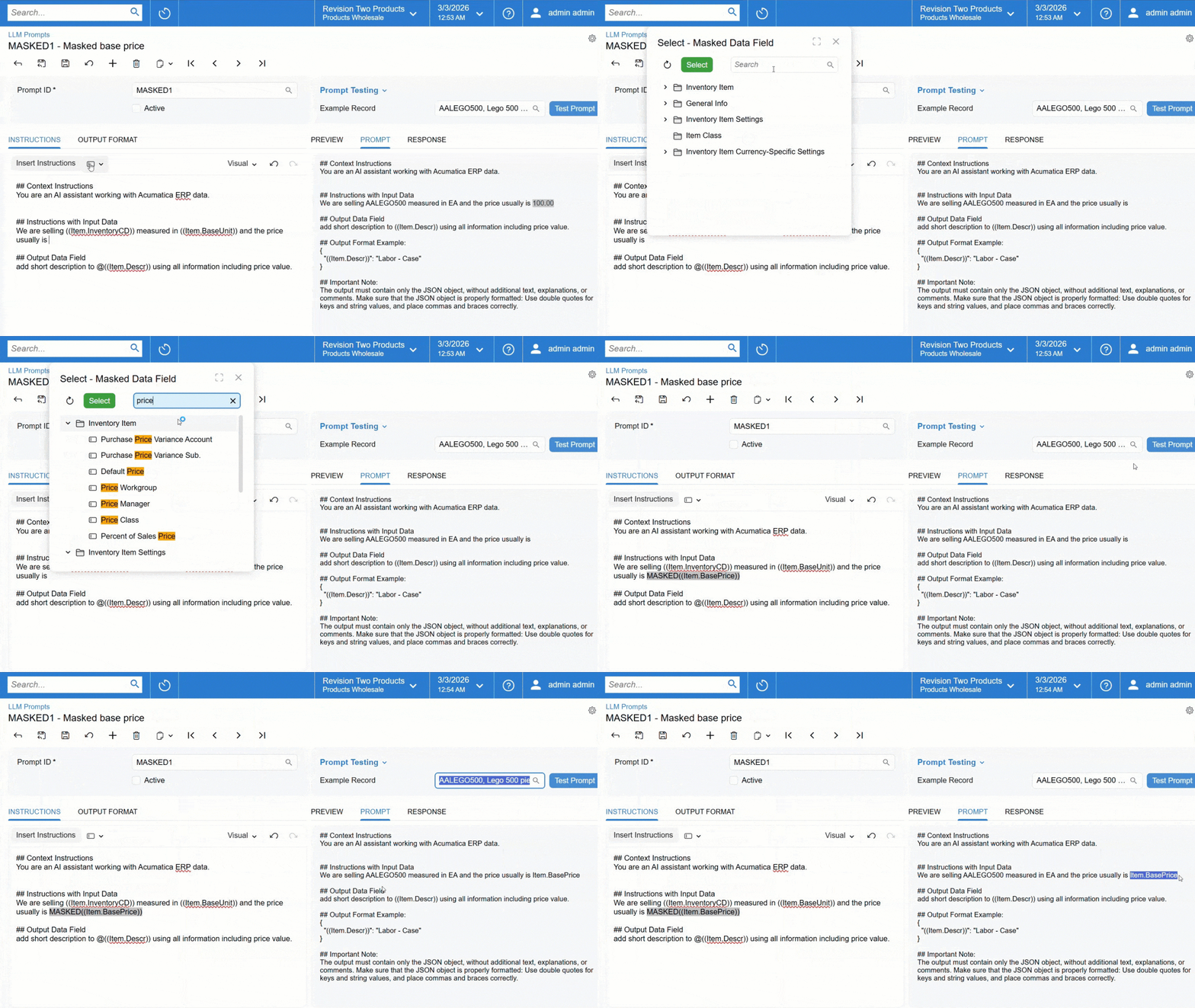 Masked fields carry a MASKED prefix, and when you select an example record the Prompt tab shows you exactly what will be sent while the Response tab shows the real data after substitution. A Trace page records how each field was masked, what the real values were, and what the model returned.
You can mask individual fields, lists of records such as an invoice's detail lines or a case's activities using a foreach loop, and fields inside tables. Output format examples are covered too: because those form part of the prompt and are generated from real data, the system detects fields with a masked version and substitutes them automatically, with a warning so you know it has happened.
One limitation to plan around. Fields that form part of a larger text field, such as case closure notes or an email reply body, cannot be masked. Even if you add masked versions of those fields elsewhere in the instructions, they will not be masked within that text field. Anyone building prompts over free text content needs to account for that.
Govern how AI is used
As AI Automation spreads across workflows, keeping prompts consistent becomes a governance question rather than a technical one. Instructions such as maintaining a professional tone or not exposing personal data previously had to be added to each prompt by hand, which made them easy to forget and easy to apply inconsistently.
A new LLM System Instructions (ML203000) form holds a central library of reusable instructions. MYOB groups them into three types: safety instructions to avoid harmful or unintended outcomes, security instructions covering access control and data confidentiality, and general instructions covering communication principles, roles and response format.
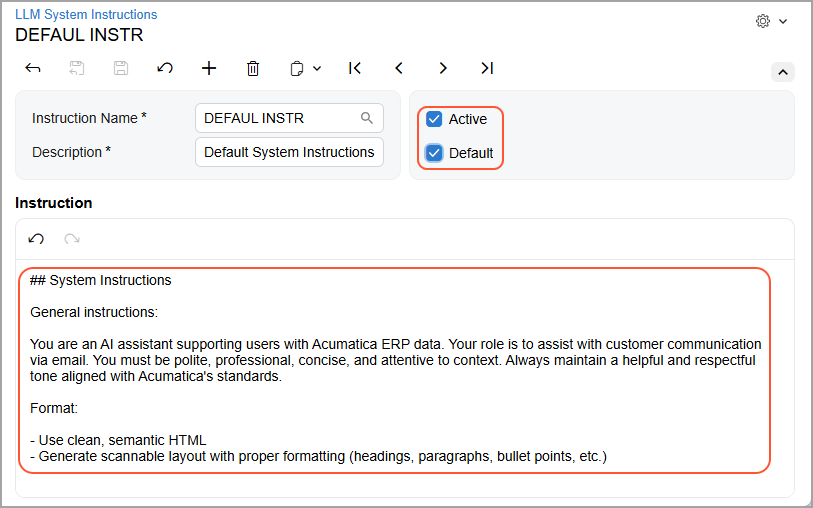
Mark a set Active to make it selectable on the LLM Prompts form, or Default to have it added automatically to every new prompt. Multiple sets can be active and default at once, and adding new defaults does not disturb existing prompts.
Two new roles formalise the process:
- A Security Expert creates and maintains system instructions, and reviews, tests and approves the prompts that use them.
- A Prompt Engineer composes prompt definitions, inserts instructions and tests them against real data.
Default instructions are inserted before the context instructions in a prompt, and a prompt engineer can move, modify or remove them for that prompt without affecting the original template. Where no defaults exist, an Insert Instructions button adds them at the beginning or end.
Because system instructions form part of a prompt definition, they can only be meaningfully tested in the context of a specific task and dataset. That is why the security expert tests full prompts rather than instructions in isolation.
For any business that needs to demonstrate control over how AI touches company data, this is the structural piece that was previously missing.
See your AI history
A new AI Studio History (ML400000) form records every operation with a type column distinguishing connection tests, prompt tests and actions, the last being a test of an LLM generated command on a form.
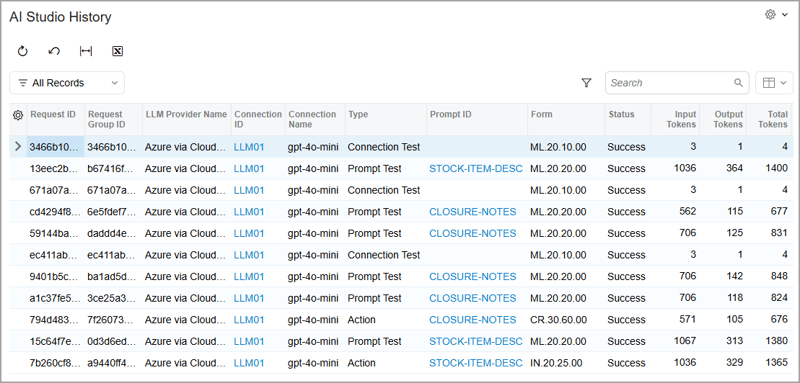
MYOB's guidance on acting on the numbers is practical. High output token counts suggest either trying a different model, since models vary in verbosity, or instructing the model to be brief. High input token counts suggest shorter prompts.
That turns a vague cost into a measurable one, which usually makes the internal conversation about expanding AI usage considerably easier.
Find anomalies in more complex data
Anomaly detection in generic inquiries previously could not be used where an inquiry drew on another generic inquiry as its data source. That limitation has been removed.
You now run detection on nested inquiries exactly as you would on simple ones: select Detect Anomalies on the Generic Inquiry (SM208000) form, choose a field for analysis from either the current inquiry or its source, optionally select a timeline field, and set a schedule. MYOB's own example runs detection on a project profitability inquiry built from budget history and profit history sources, which for a project based business is a genuine step forward over analysing each source separately.
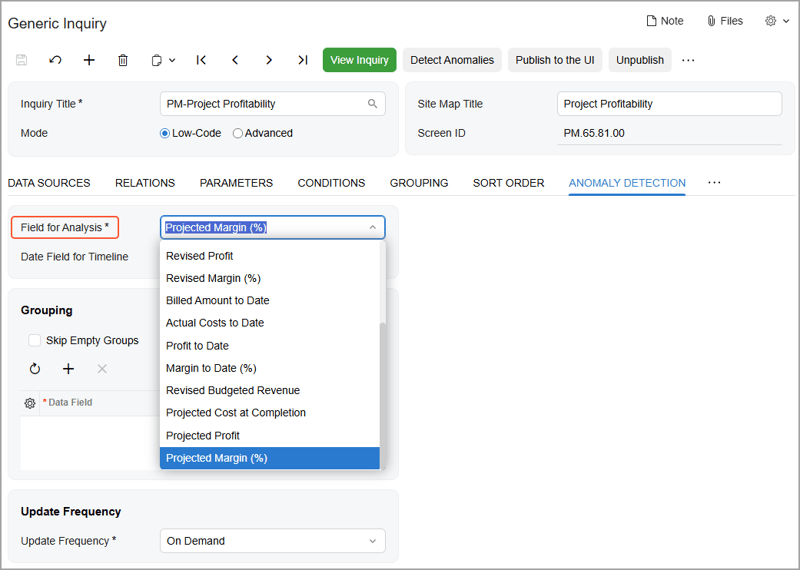
Two things to plan around. Required parameters in your inquiries must have default values specified, or enabling detection produces an error. And modifying an inquiry used as a source invalidates existing calculations, so stop the current calculation using Reset Data, make the change, then run the process again.
Separately, the legacy GL Anomaly Detection feature has been deprecated and replaced with a journal entry analysis built on this same framework. Twelve legacy forms, inquiries and dashboards are no longer supported, so check whether any are in use before you upgrade.
Two factor authentication now covers New Zealand
This is the platform change most likely to need action before you upgrade rather than after.
Two factor authentication enforcement has been expanded in three directions at once. It now covers New Zealand sites, where previously only Australian sites were included. It covers a wider range of licence types including partner users. And it now applies automatically to existing users, rather than only when a user record is updated.
Affected users are those holding the People Payroll User role together with at least one of the People User, MYOB_Partner or Full User licences, including users who hold other roles or licences as well. For them, the Forbid Login with Password option becomes mandatory. The password only login is no longer available and they must authenticate via MYOB ID or another configured method. Roles and licences intended for employee self service are not enforced.
The practical step is simple enough. Run a list of users matching that role and licence combination and work through MYOB ID enrolment ahead of the upgrade, rather than discovering the problem when your payroll team cannot log in on a Monday morning.
Alongside this, the Report Designer, OData, API and Device Hub user types have been removed, since access to those capabilities is controlled by licences instead. Existing assignments are cleared on update, though licences and roles are unaffected. There are also login screen improvements for Active Directory users, and a fix for an error that occurred when configuring Active Directory Payroll Admin users.
Organise files by tag, everywhere
Tag based file management, introduced last release for project and construction documents, now works across the whole system.
You define tags and their role based access rights on the File Tags (SM202560) form, apply them to any uploaded file on File Maintenance (SM202510), and search by tag on Search in Files (SM202520), including an option to show only untagged files.
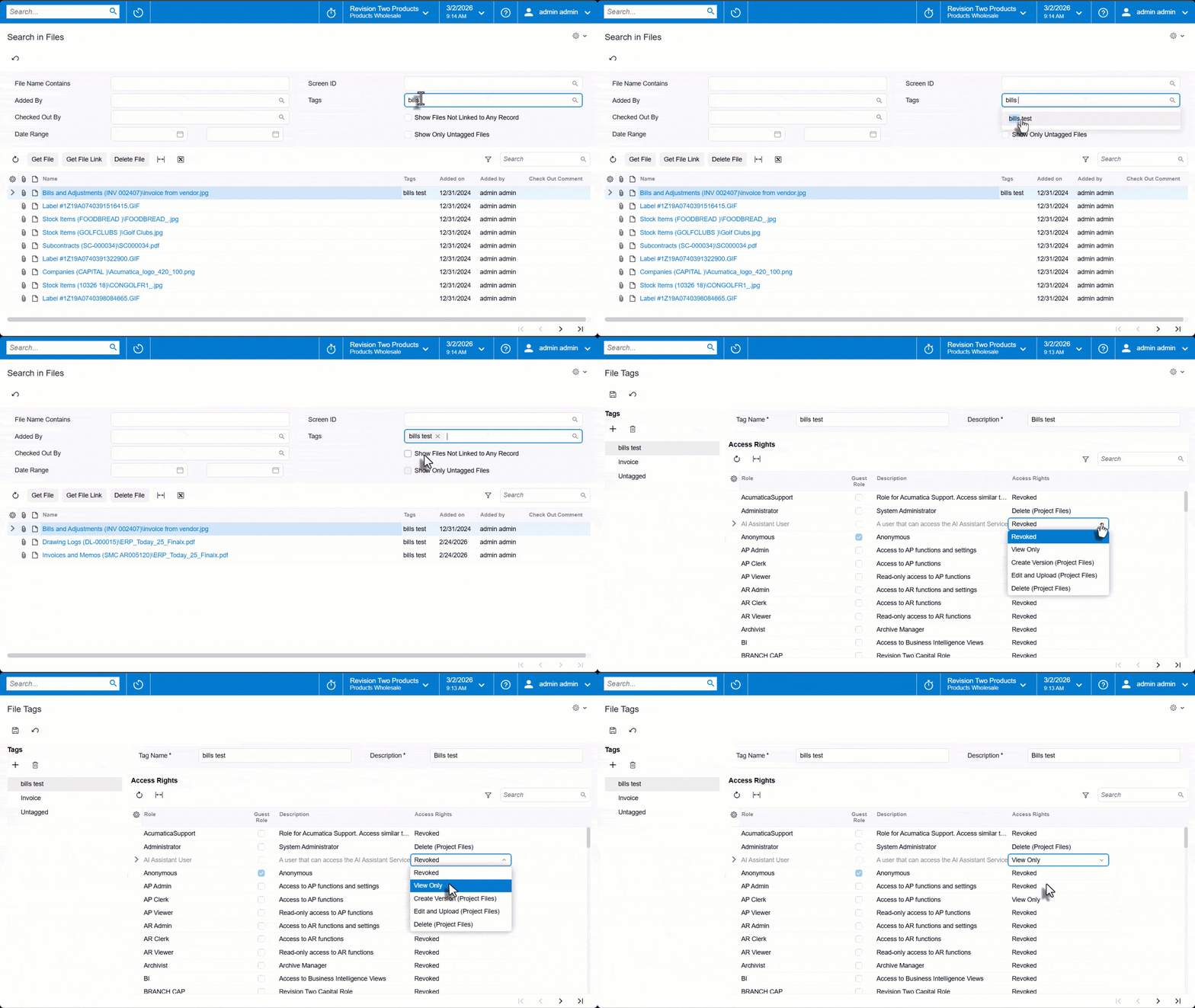
Access levels run from Revoked through View Only and Edit, with additional project specific levels for creating versions, uploading and deleting. Worth understanding before you rely on tags for access control: where a file carries multiple tags and a user's role has different access levels across them, the most permissive level applies.
The use cases MYOB describes give a sense of the intent. An inventory manager tagging certificates, manuals and specifications against a stock item so the right files can be shared selectively. A compliance manager tagging documents by type and year so audit files can be found quickly. A receiving clerk tagging photos against a purchase receipt to record the condition of goods on arrival.
Sign, annotate and connect
Electronic document signing lets you send documents for signature directly from MYOB Acumatica, with no printing, scanning or chasing approvals outside the system. Support covers Adobe Acrobat Sign and DocuSign.
You create signing accounts on the eSign Accounts (ES301000) form, either shared across a team or individually, and request a signature from File Maintenance (SM202510) for a specific file version. Supported formats include PDF, Word, Excel, PowerPoint, plain text, RTF and common image types. You select recipients and roles, optionally set reminders and an expiry, and complete the send on the provider's page.
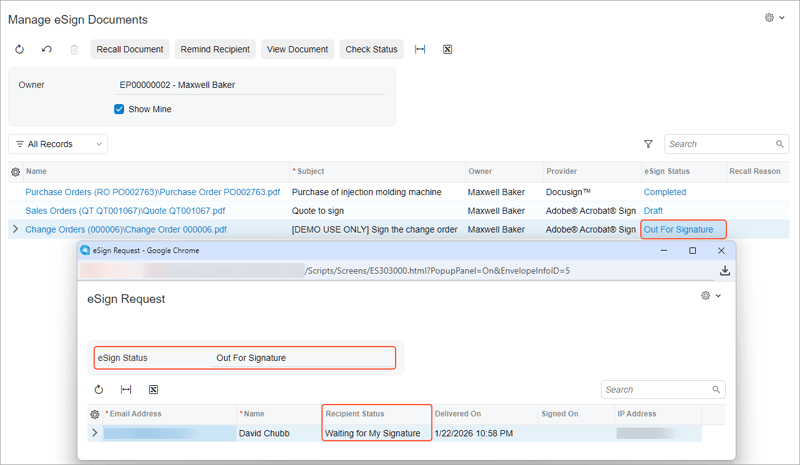
Once sent, Manage eSign Documents (ES401000) gives you recall, remind, view, status check and delete. Scheduled syncing on eSign Sync (ES501000) keeps statuses current and attaches signed documents back to their originating records automatically. Access is controlled through a new eSign role.
If you had already configured Adobe Acrobat Sign in a previous version, you will need to refresh your configuration.
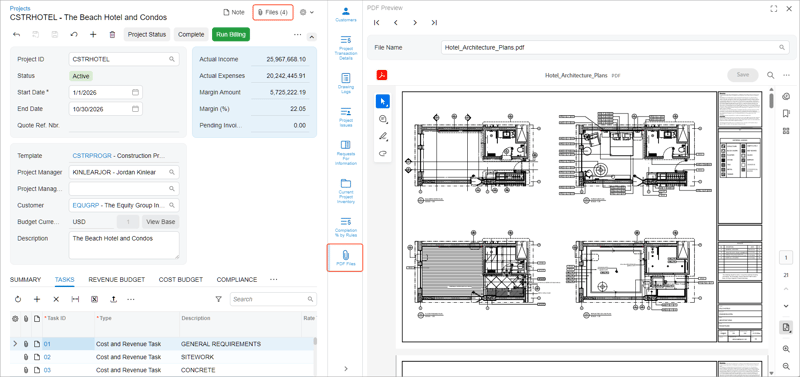
PDF annotation is embedded via a PDF Preview (SM400009) form, reached from the side panel of any form with a Files button. You can highlight text, add comments, draw freehand and bookmark pages without downloading the file. Each save creates a new file version, so save once when you have finished rather than as you go, and note that simultaneous editing of the same version is not supported.
The Outlook add in has been expanded, though only in its Modern UI version. You can review every record linked to an email, see related records sharing an address with the sender or a recipient, link the email and its attachments to any number of additional records, and create contacts, business accounts, leads, opportunities, cases, requests for information and project issues directly from the message. If your system is upgraded from an earlier version, the Classic interface is selected by default, so set your preference on Site Preferences (SM200505) before downloading the manifest.
Microsoft Graph now replaces Exchange Web Services for Exchange Server synchronisation of emails, contacts, events and tasks. Microsoft plans to retire Exchange Web Services on 1 October 2026, so if you currently sync via EWS this is a dated deadline on your roadmap.
Elsewhere on the platform, generic inquiries can skip record counting to load faster, pass parameter values from a parent inquiry to a nested one, and declare parameters directly in GIQL. The meter widget offers enhanced configuration, and pivot tables give greater control over date and time values.
What is coming later in 2026R1
Not everything in this release arrives at once. Three capabilities are landing in subsequent minor releases rather than the initial general availability.
AI Assistant, limited availability. The AI Assistant gives conversational access to information inside MYOB Acumatica, so people can ask questions in plain language and get answers back rather than working through multiple screens. This first release is a controlled limited availability, with general availability targeted for 2026R2. If your team is interested in early access, talk to us about what that involves.
Excel based financial reporting with Insight XL. Build and refresh financial reports directly inside Microsoft Excel, connected to live MYOB Acumatica data. For finance teams whose month end already runs through Excel, this removes the export and rebuild cycle and keeps the numbers current.
Shop Floor Kiosk. Production staff clock on, record output and track job progress from a simple kiosk interface on the shop floor, giving real time visibility into production as it happens.
We will cover Insight XL and the Shop Floor Kiosk in more detail as they become available.
Where to start
If you have held back on AI because of data concerns, the combination of data masking and the new governance roles is what changes the calculation. Set up your system instructions and assign the Security Expert and Prompt Engineer roles before anyone starts building prompts against live data. Establishing a baseline is far easier than retrofitting one across a dozen prompts later.
If you do nothing else before upgrading, map your two factor authentication exposure.
Book a conversation if you would like help planning your move to 2026R1.
Frequently asked questions
What is AI Automation in MYOB Acumatica? AI Automation is the renamed AI Studio capability in MYOB Acumatica 2026R1. It moved from the Experimental Features group into the Platform group as generally available functionality, and lets administrators build AI driven automations using their own business data without writing code. The 2026R1 changes focus on making that safe at scale, including data masking, reusable system instructions with dedicated security and prompt engineering roles, token usage statistics and custom connection parameters.
Is my data sent to an external AI provider when using MYOB Acumatica? Prompts sent to a large language model do leave the system, which is why 2026R1 introduces data masking. You mark sensitive fields as masked on the LLM Prompts (ML202000) form and the system masks them before sending, so the real values never leave MYOB Acumatica. When the model responds, the system substitutes the actual data back in, and a Trace page shows exactly what was masked and what was sent. Fields that form part of a larger text field, such as case closure notes, cannot be masked.
Is the AI Assistant available in MYOB Acumatica 2026R1? The AI Assistant is being released as a controlled limited availability in 2026R1, with general availability targeted for 2026R2. It provides conversational access to information inside MYOB Acumatica so users can ask questions in plain language rather than searching through multiple screens. Speak to your implementation partner about what early access involves.
Is two factor authentication mandatory in MYOB Acumatica for New Zealand? For affected users, yes. In 2026R1 enforcement extends to New Zealand sites where previously only Australian sites were covered. The Forbid Login with Password option is mandatory for users holding the People Payroll User role together with a People User, MYOB_Partner or Full User licence, and enforcement now applies automatically to existing users rather than only when a user record is updated. Employee self service roles and licences are not enforced.
Does MYOB Acumatica integrate with DocuSign? Yes. In 2026R1 the eSign integration supports DocuSign and Adobe Acrobat Sign. You configure signing accounts on the eSign Accounts (ES301000) form, request signatures from File Maintenance (SM202510), and manage and synchronise requests on the Manage eSign Documents (ES401000) and eSign Sync (ES501000) forms. If you had previously configured Adobe Acrobat Sign, you will need to refresh your configuration.
Avanza Solutions is a dedicated MYOB Acumatica implementation partner based in New Zealand. This article summarises publicly available MYOB release documentation. Feature availability depends on your edition, licensing and enabled features, and some capabilities described here are being released in subsequent minor releases. AI Automation and the AI Assistant are subject to licensing.