MYOB Acumatica 2026R1 removes several long standing sources of manual work in finance. Foreign currency payments can be entered in the document currency without calculating a cross rate by hand. Refunds can settle bills, invoices and credits in one transaction. Depreciation methods can be scheduled to change from a future period rather than restating history. On the CRM side, opportunities and quotes now show estimated margin, and a new Activity Stream puts every interaction on a record into one readable view.
Stop doing cross rate maths by hand
Bank statements rarely include cross rates, so anyone settling a foreign currency invoice from a New Zealand dollar account has had to work the conversion out themselves, with the rounding gains and losses that follow.
From 2026R1 you enter the amount paid directly in the document currency and the system calculates the cross rate. This works on the Payments and Applications (AR302000) form for customer payments, the Checks and Payments (AP302000) form for supplier payments, and the Process Bank Transactions (CA306000) form when creating payments from a bank statement.
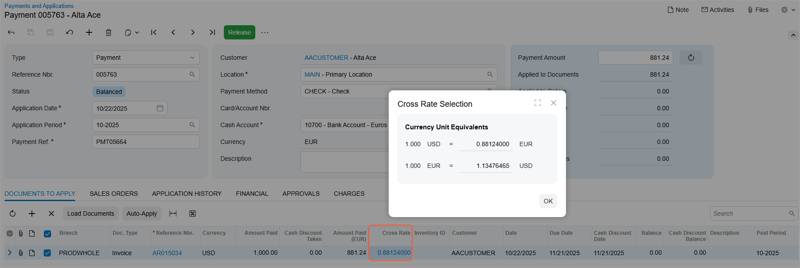
The Cross Rate value is now a link that opens a selection dialog where you can enter either a direct or a reciprocal rate and have the other recalculated. Cash discount taken, write off amounts and withholding tax can all be entered in the document currency too.
Small change, but it removes a daily irritation and a recurring source of small discrepancies. Requires the Multicurrency Accounting feature.
Settle refunds in one transaction
Where credit adjustments exceed outstanding bills, or a customer has been over credited, settling everything previously took several transactions.
Now a vendor refund on Checks and Payments (AP302000) can include Bill and Credit Adjustment types alongside Debit Adjustment and Prepayment. A customer refund on Payments and Applications (AR302000) can include Invoice, Debit Memo and Overdue Charge alongside Credit Memo, Payment and Prepayment.
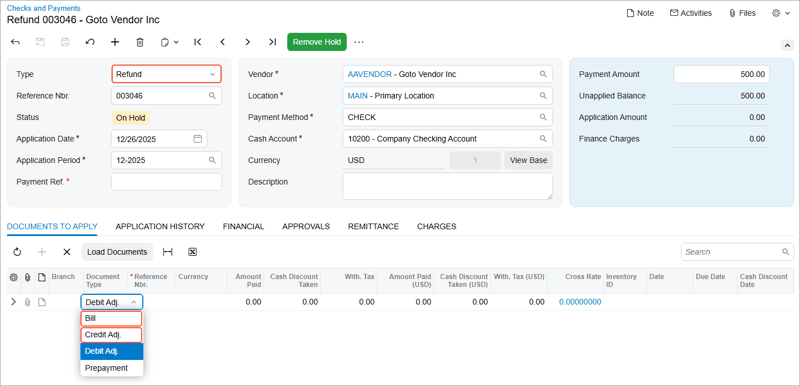
Refunds created at a parent customer level can be applied to documents belonging to child accounts, which simplifies settlement for group structures. The same capability works from bank reconciliation, where a matched disbursement or receipt can generate a refund applied across multiple document types in one step.
Existing controls are unchanged. A refund cannot be saved out of balance, and voiding a refund reopens the applied documents.
Prepayment invoices for supplier deposits
Deposits to suppliers have been handled through prepayment requests, which could calculate tax but did not recognise it or include it in tax reports.
2026R1 introduces a proper prepayment invoice, a new Prepmt. Invoice document type on the Bills and Adjustments (AP301000) form with its own numbering sequence and approval workflow. Tax is recognised when the prepayment is paid, and reversed when the prepayment is later applied to a supplier bill so the same tax is never recognised twice.
Prepayment invoices can also be raised directly from a purchase order. Order details copy across, the two documents stay linked, and paid prepayment invoices apply automatically to the bill when it is created. You can raise multiple prepayment invoices against a single purchase order, which supports milestone based deposits.
Five accounts payable ageing reports have been updated so that only the unpaid portion is included and fully paid prepayment invoices drop off.
Note that this sits behind the GST Recognition on AP Prepayments feature, and once enabled, the Create Prepayment Invoice command replaces Create Prepayment Request. Existing prepayment requests can still be processed but new ones cannot be created. Talk to us about whether this fits your GST treatment before switching it on.
Schedule a depreciation method change
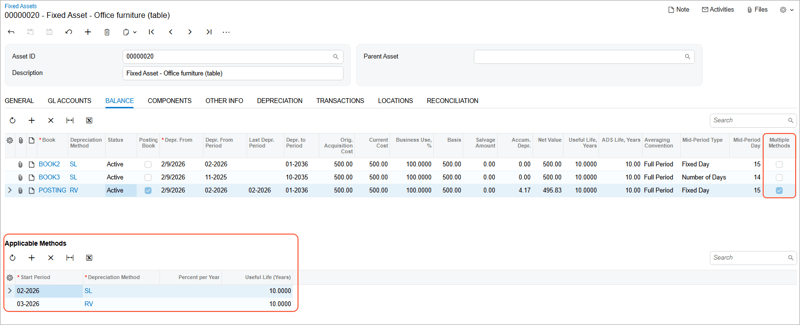
If your company adopts a new depreciation approach from the start of next year or next quarter, you can now schedule it rather than restate what has already been posted. Each fixed asset book holds a list of applicable methods, each with its own start period.
This also helps during a migration. You can import a fixed asset register from another system without recalculating historic depreciation across the full life of each asset, which is a meaningful saving for anyone moving off a legacy system.
Scheduling is available for the methods migrated to the new depreciation engine, including New Zealand Diminishing Value and New Zealand Straight-Line, both Australian methods, both straight line variants and the remaining value methods.
Two behaviour changes to note. Previously the system ignored the salvage amount during depreciation for the New Zealand and Australian methods, which could take net value below salvage. From 2026R1 depreciation stops when net value falls below salvage. To keep the earlier behaviour, set Salvage Amount to 0 on the Fixed Assets (FA303000) form. Separately, changing Percent Per Year no longer recalculates useful life automatically.
MYOB notes that customers remain responsible for ensuring data, assumptions and outputs meet applicable legal, tax and accounting requirements, and recommends independent professional advice where required.
Anomaly detection on journal entries, rebuilt
The legacy GL Anomaly Detection feature has been deprecated. In its place, a new GL-ML-Journal Entries Analysis generic inquiry and a Journal Entries Analysis (GL3010ML) form analyse journal entries through the same framework used elsewhere in AI Automation.
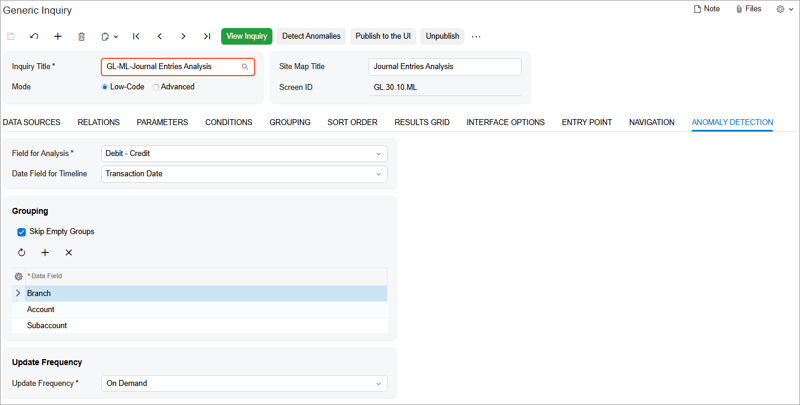
The analysis calculates expected transaction values, compares them with actuals, and assigns a severity of Normal, Medium or Significant so you can prioritise what to review. Reviewers can tick a Reviewed check box and record an explanation, which gives you an audit trail of review decisions rather than just a list of flags.
Twelve legacy forms, inquiries and dashboards are no longer supported. If your team uses any of them, check before you upgrade.
Better data entry, cleaner data
Two smaller changes with a real effect on data quality.
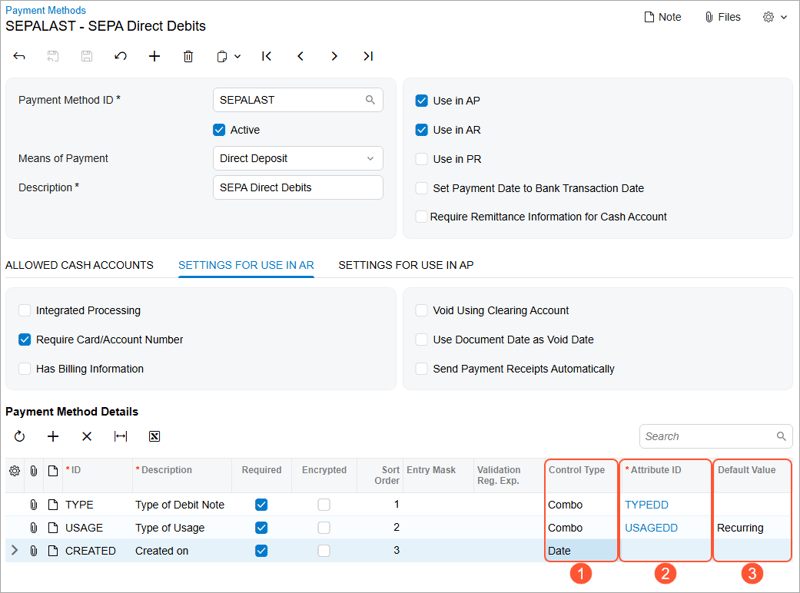
Payment method details can now use drop down lists and date pickers rather than free text. On the Payment Methods (CA204000) form you set a control type of Text, Combo or Date for each detail, and for Combo you link an attribute supplying the allowed values. The settings apply on Customer Payment Methods (AR303010), Vendors (AP303000) and Vendor Locations (AP303010). Useful for anyone maintaining bank account details across a large supplier base.
Duplicate validation now covers customers and vendors. When you save a new record the system checks it against existing business accounts, customers and vendors, and depending on your settings either blocks the save or flags it on a Duplicates tab where you can merge or mark as validated. Existing records can be checked on demand.
See the margin before you discount
Opportunities (CR304000) and Sales Quotes (CR304500) now calculate an estimated margin amount and percentage for each line, with totals in the summary area. Margin percentage is also available as a column in the opportunities and quotes lists, so a sales manager can sort a pipeline by profitability rather than value alone.
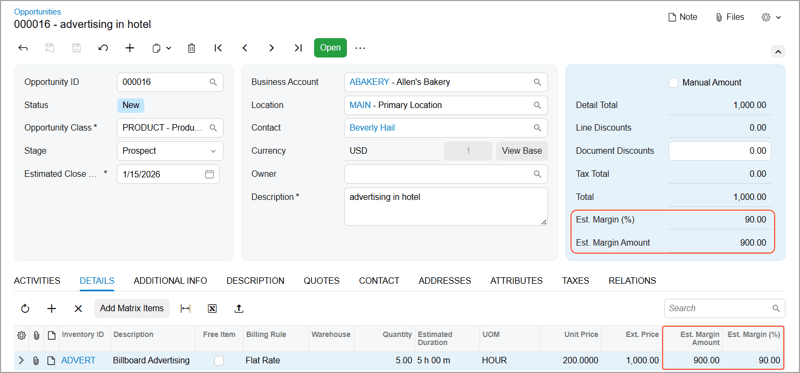
The practical value is in negotiation. The cost of a concession is visible at the point the concession is being considered, rather than after the job is won.
Understand a record without reading it
Three CRM additions reduce the time spent gathering context.
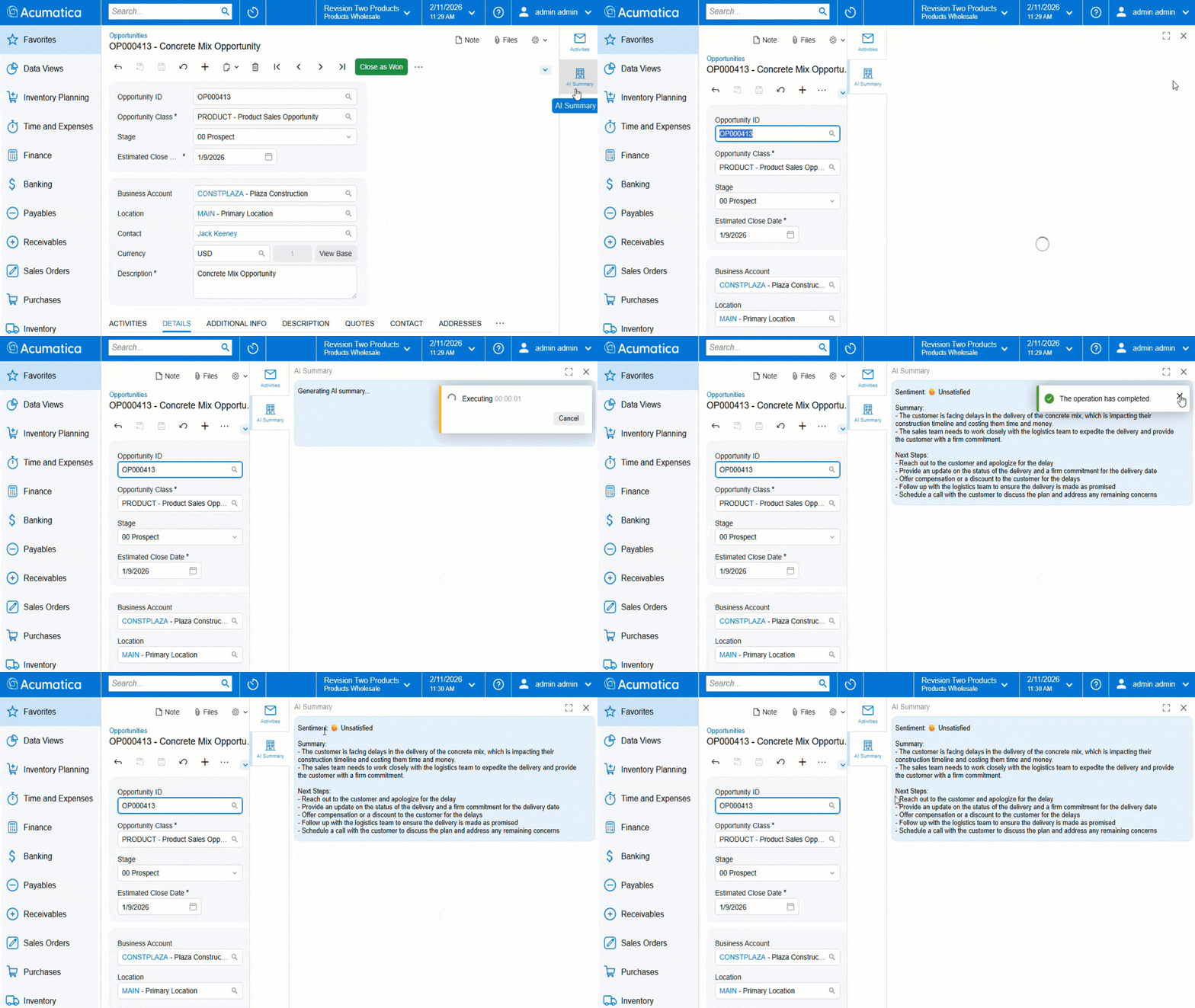
AI generated summaries for opportunities and cases give you a quick read on where things stand: a sentiment indicator based on the customer's wording in the most recent incoming activity, a summary of recent activity focused on expectations and concerns, and recommended next steps. The prompts are inactive by default and an administrator activates them on the LLM Prompts (ML202000) form. Requires the AI Automation feature.
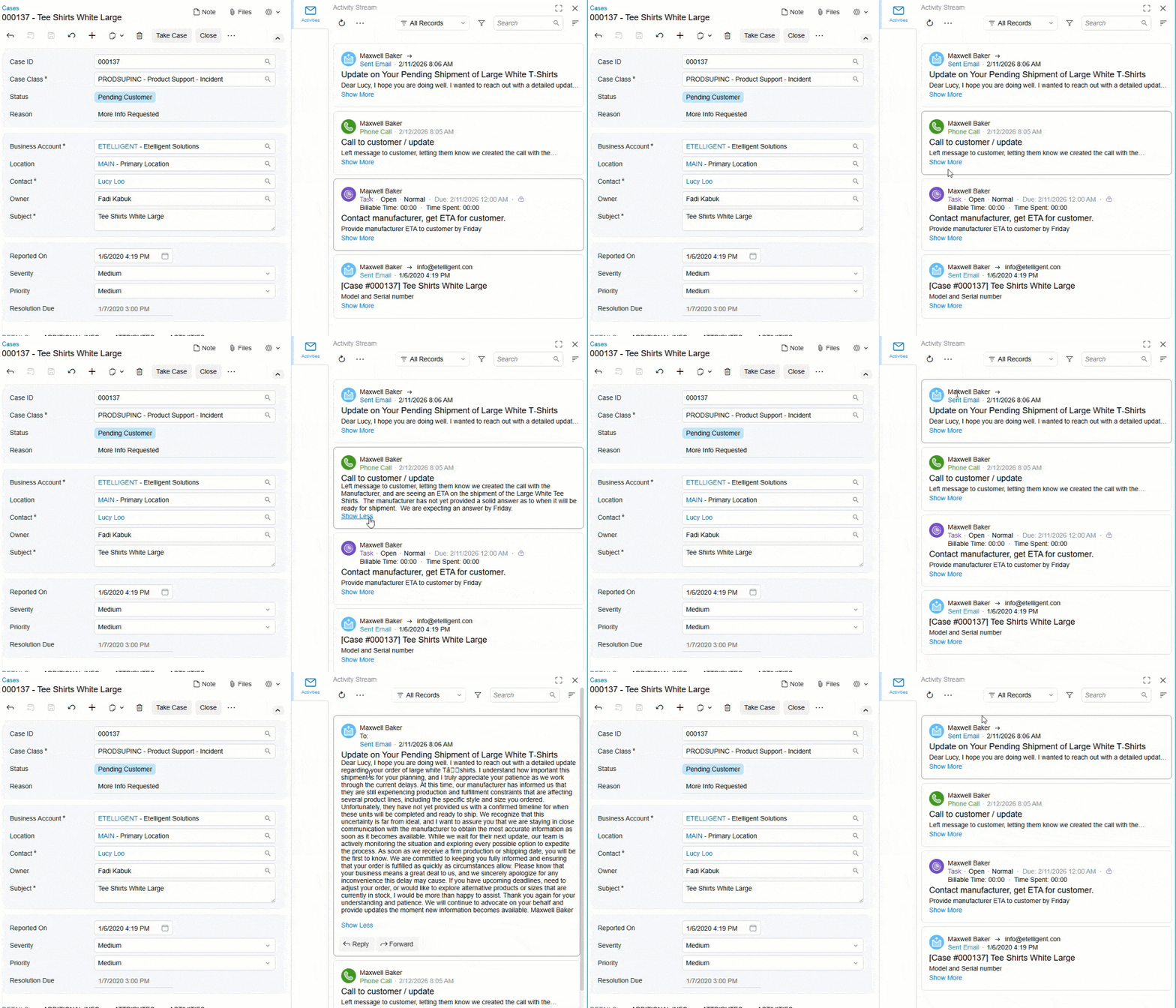
The Activity Stream is a side panel on cases, contacts, opportunities and sales quotes showing every related activity as a tile you can expand. You can search across all activities, filter by type or by presence of attachments, and sort, and email replies and forwards are grouped into conversational threads. Administrators can colour code activity types so they are recognisable at a glance. The existing Activities tab remains available.
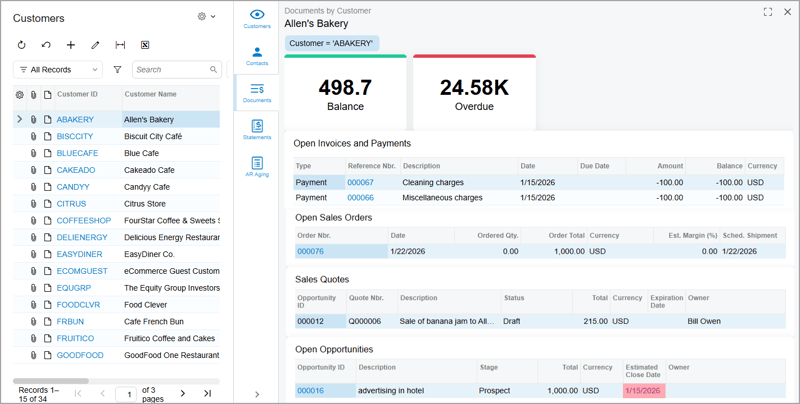
Side panels on the customers list surface customer settings, contacts, documents, statements and AR ageing without opening another form. The documents tab shows balance and overdue totals alongside open invoices, sales orders, quotes and opportunities. Ageing is broken into 0 to 30, 30 to 60, 60 to 90 and 90 plus day buckets. Equivalent panels exist for vendors, salespeople and employees. For a credit controller working a collections list, this is a materially faster way to get context before picking up the phone.
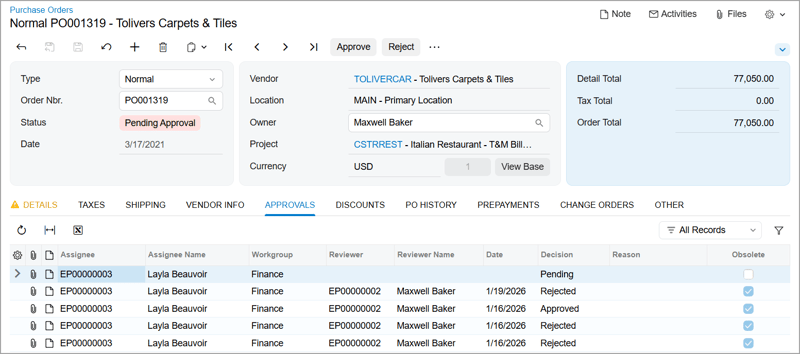
Rounding out CRM, you can now track a record's full approval history, and attach multiple shipments or purchase orders to a single email.
Frequently asked questions
Can I enter foreign currency payments without calculating the cross rate in MYOB Acumatica? Yes. From MYOB Acumatica 2026R1 you can enter the amount paid directly in the document currency on the Payments and Applications (AR302000), Checks and Payments (AP302000) and Process Bank Transactions (CA306000) forms, and the system calculates the cross rate. You can also open a Cross Rate Selection dialog to enter either a direct or a reciprocal rate. This requires the Multicurrency Accounting feature.
Has fixed asset depreciation changed in MYOB Acumatica 2026R1? Yes, in two ways. You can now schedule different depreciation methods to take effect from future periods without recalculating past depreciation, which is available for methods including New Zealand Diminishing Value and New Zealand Straight-Line. Separately, for the New Zealand and Australian methods the system now stops depreciation when net value falls below the salvage amount, where previously it ignored salvage. To preserve the earlier behaviour, set Salvage Amount to 0 on the Fixed Assets (FA303000) form.
Does MYOB Acumatica show margin on sales quotes? Yes. From 2026R1 the Opportunities (CR304000) and Sales Quotes (CR304500) forms calculate an estimated margin amount and percentage for each detail line and show totals in the summary area. Margin percentage is also available as a column in the opportunities and sales quotes lists of records, so you can sort by profitability.
What is the Activity Stream in MYOB Acumatica? The Activity Stream is a side panel introduced in 2026R1 on the Cases, Contacts, Opportunities and Sales Quotes forms. It shows all activities related to a record as tiles that can be searched, filtered and sorted, with email replies and forwards grouped into conversational threads. The existing Activities tab remains available for backward compatibility.
View the full MYOB Acumatica 2026R1 Release notes
Avanza Solutions is a dedicated MYOB Acumatica implementation partner based in New Zealand. This article summarises publicly available MYOB release documentation. Feature availability depends on your edition, licensing and enabled features. Nothing in this article constitutes tax or accounting advice.