
If your team has ever struggled with manual time entry, rigid weekly time card sequences, or confusion around time zones for travelling staff, these three updates will make a noticeable difference to your daily workflows.
Note: This feature is available as part of the Modern UI, which is are rolling out in stages in 2026.
Track Time with a Single Click
The most exciting addition is built-in timer functionality for project tasks. Open a project task, click the timer icon, and you're on the clock. The timer runs in the top pane across all screens, so you can switch between tasks, pause, resume, and manage multiple active timers simultaneously. When you clock out, the system automatically logs your time — no manual entry required. Time logs can be reviewed on the Employee Time Cards form and converted to time activities with a single click. You can also configure custom time types (Work, Break, Travel, or your own categories) to match how your business actually operates.
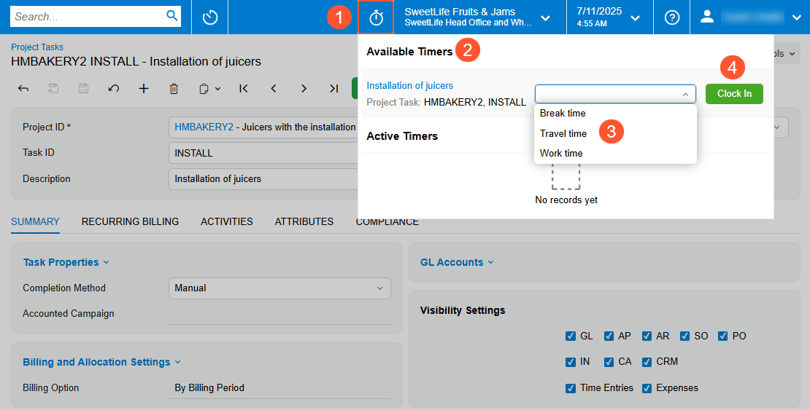
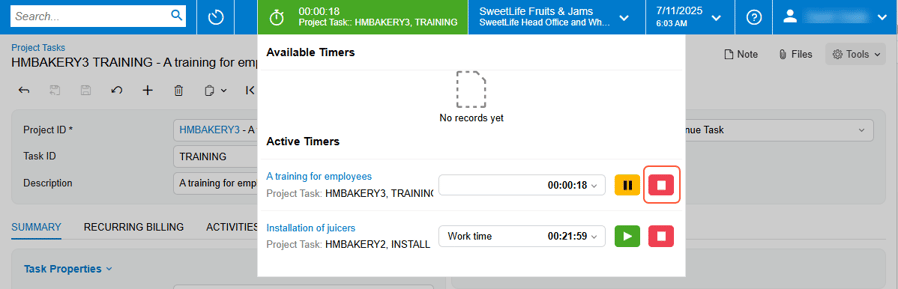
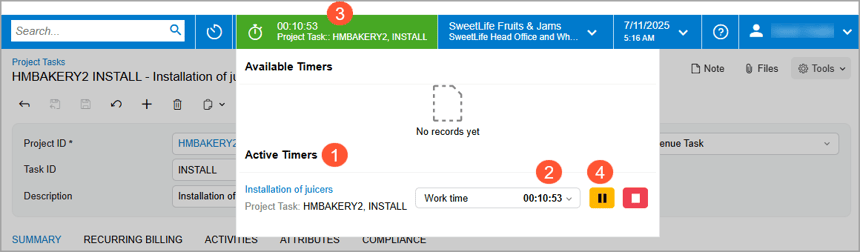
Create Time Cards for Any Week — Not Just the Next One
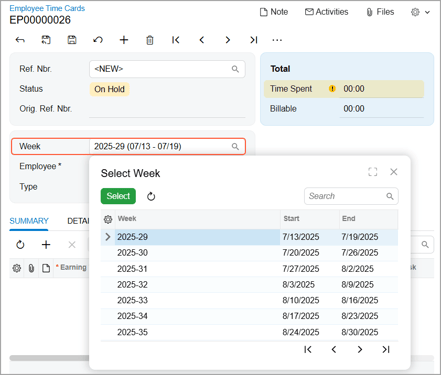
Previously, employee and equipment time cards had to follow a strict weekly sequence. Now you can create time cards for any week — past or future — without filling in every week in between. This eliminates unnecessary administrative overhead when time cards are only needed for weeks with actual activity. The "Preload from Previous Time Card" function intelligently finds the most recent prior time card even when weeks are non-consecutive.
Accurate Time Tracking Across Time Zones
New "Reported On," "Reported At," and "Reported in Time Zone" columns preserve the original time zone context when viewing time activities. The system determines time zones from user profiles, work calendars, or site preferences, and the mobile app uses device settings. This ensures accurate reporting regardless of where your employees travel, with project transactions using the reported date for correct labour rate application and billing. For businesses with staff working across multiple regions, this removes a common source of billing and reporting errors.
Want to make the most of MYOB Acumatica 2025.2?
Our team at Avanza Solutions can walk you through the features that matter most to your business and help you plan your upgrade.
Book a demo | View the full release notes
The information in this blog is based on the MYOB Acumatica 2025.2 release and is intended for informational purposes only. Avanza Solutions is an independent MYOB Acumatica implementation partner and is not responsible for the development, release, timing, or availability of any features or functionality described. Feature availability may vary by licence, configuration, and region. The development and release of any product features remains at the sole discretion of MYOB. This content does not constitute a commitment to deliver any material, code, or functionality, and should not be relied upon in making purchasing decisions. For the most current product information, refer to the official MYOB Acumatica release notes.