
With eleven enhancements, the Projects and Construction module in 2025.2 delivers a comprehensive overhaul of how you monitor, manage, and close projects. The centerpiece is a new unified dashboard that puts every critical metric at your fingertips.
Every Project Metric in One Place
The new Project Status form is the standout feature — a unified 360° dashboard that consolidates KPIs, budgets, documents, financials, and project contacts into a single view. The Summary dashboard provides scorecards for project completion, gross profit, margin, revenue metrics (budgeted vs. billed, overbilling/underbilling), and cost metrics (budgeted vs. actual, commitments, remaining budget). Each scorecard links directly to the underlying data, so you're never more than one click away from the detail. A navigation pane gives you quick access to financials, subcontracts, project management documents, and production orders — with the ability to create records on the fly. The More menu provides one-click access to key financial reports including AR/AP ageing, cash flow, WIP, and project variance.
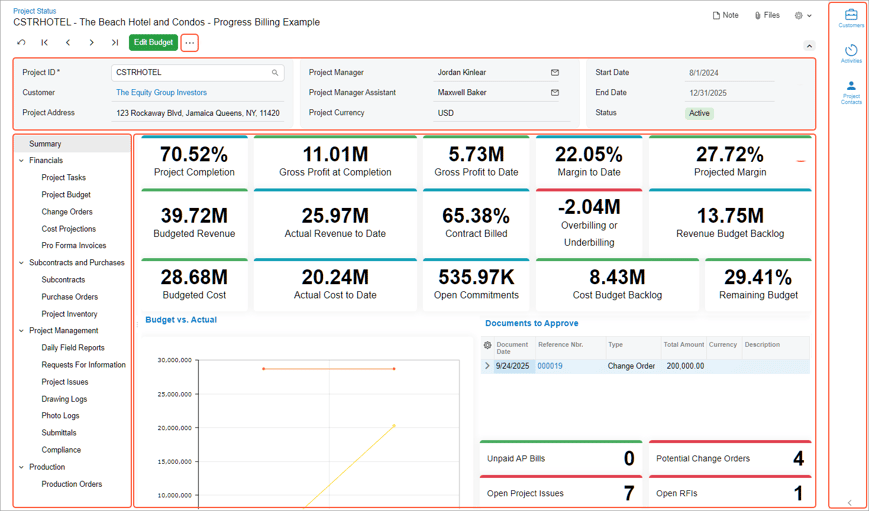
Note: This feature is available as part of the Modern UI, which is rolling out in stages in 2026. The functionality is available in the Modern UI only if the new 360 Dashboards feature in the Construction feature group is enabled on the Enable/Disable Features (CS100000) form.
Close Completed Projects Properly with the New Closed Status
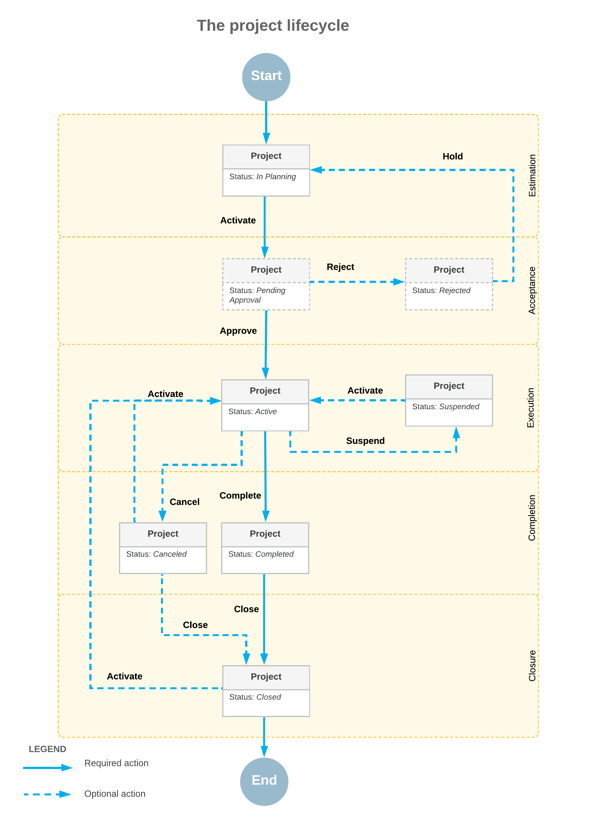
Until now, there was no formal way to close a completed or cancelled project. The new Closed status changes that. When you close a project, it becomes read-only, disappears from lookup tables and data entry forms, and is excluded from billing, allocation, and balance recalculation. The system performs a comprehensive readiness check across dozens of related forms before allowing closure — so nothing slips through the cracks. Closed projects remain available in reports for historical analysis, and can be reactivated if work resumes.
Projects and Construction: Easily Prepare GAAP-Compliant Financial Statements
Construction projects frequently experience timing differences between when revenue is recognised and when costs are incurred. With MYOB Acumatica 2025.2.1, you can now narrow these gaps, streamline GAAP compliance, and significantly reduce manual GL adjustments.
The release introduces a new document type—the project WIP adjustment—created from the Project WIP Adjustment (PM305600) form. Using project WIP adjustments, you can:
-
Adjust revenue for the reporting period without manually editing GL transactions
-
Automatically calculate overbilling and underbilling amounts
-
Post auto-reversing GL transactions to recognise current-period revenue
-
Support GAAP-compliant reporting for construction projects
Create WIP adjustments directly from date-sensitive cost projections so changes are accurately reflected in your financial statements, while improving visibility into project costs and revenue by reviewing the latest projections before posting adjustments. You can refine overbilling and underbilling amounts to align with actual project costs and send targeted email reminders to project managers to refresh outdated projections or add any that are missing. In addition, you maintain control over how detailed your GL postings are through flexible options to use detailed or default accounts at either the project or summary level.
Accelerate Project Success with Ready-to-Use Roles
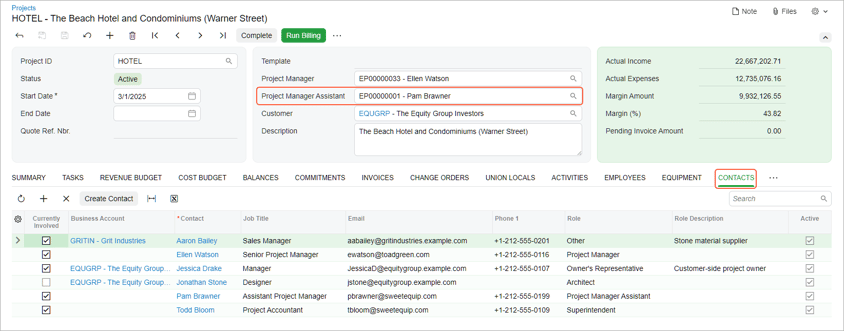
Struggling to keep track of who has worked on—or is currently involved in—a project? In MYOB Acumatica 2025.2.1, you can now manage a project’s contact list directly from the project view and add new contacts as you go. This enhancement makes it easier for project teams to coordinate and stay aligned.
From any project on the Projects (PM301000) form, you can quickly see who the project manager assistant is and which other team members are participating, as shown below. The Contacts tab provides a complete list of project participants, including subcontractors, suppliers, and employees, along with key details such as name, job title, role, email address, and phone number.
Keep Projects Moving with Improved Mobility
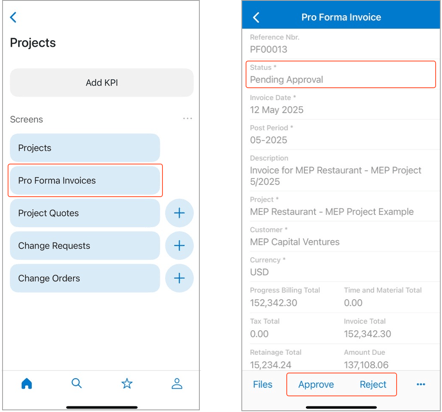
With the upgraded mobile capabilities, you can now create and manage change orders directly from your device, approve pro forma invoices with a single tap, and review project documents in real-time.
Automate Cost Code Assignment with Intelligent Defaults
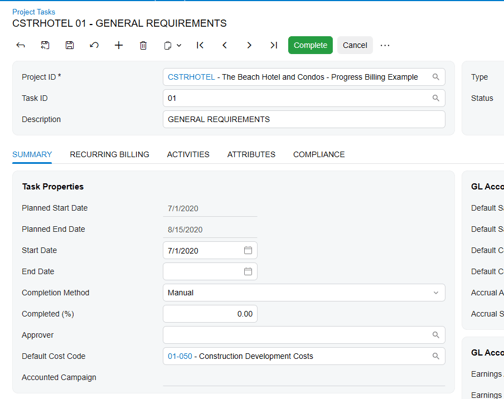
Streamline construction and professional service project accounting with Default Cost Codes that intelligently populate assignments from preferred sources. By eliminating manual data entry and increasing accuracy, teams work more efficiently and maintain consistent cost tracking on every project, freeing up resources to drive profitability and results.
Streamline Construction Projects with Smart Document Control
Transform your construction document workflow with MYOB Acumatica's intelligent Document Management system. Automatically tag and organise RFIs, submittals, contracts, and photos while customising labels for your team’s needs. Seamlessly integrate with other construction software to eliminate double entry, reduce filing time, and ensure project documents stay organised—so you can focus on building success, not managing paperwork.
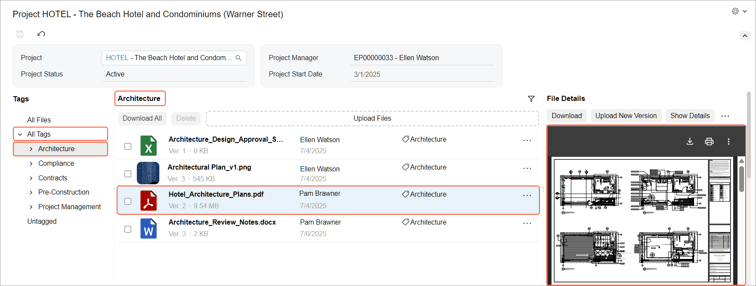
Note: This feature is available as part of the Modern UI, which are rolling out in stages in 2026. The functionality is available in the Modern UI when the new Document Management feature in the Projects feature group is enabled on the Enable/Disable Features (CS100000) form.
Want to make the most of MYOB Acumatica 2025.2?
Our team at Avanza Solutions can walk you through the features that matter most to your business and help you plan your upgrade.
Book a demo | View the full release notes
The information in this blog is based on the MYOB Acumatica 2025.2 release and is intended for informational purposes only. Avanza Solutions is an independent MYOB Acumatica implementation partner and is not responsible for the development, release, timing, or availability of any features or functionality described. Feature availability may vary by licence, configuration, and region. The development and release of any product features remains at the sole discretion of MYOB. This content does not constitute a commitment to deliver any material, code, or functionality, and should not be relied upon in making purchasing decisions. For the most current product information, refer to the official MYOB Acumatica release notes.